

Every growing business reaches a tipping point where manual processes start working against the team instead of for it. Invoices sit in approval queues for days. Employee onboarding checklists live in scattered spreadsheets. Project updates get buried in email threads. When these inefficiencies compound across departments, they cost real revenue, not just time.
Automation software solutions address this problem by replacing repetitive, rule-based tasks with workflows that run on their own. According to McKinsey, up to 70% of employee tasks across industries could be partially or fully automated using current technology. For small and medium enterprises operating with lean teams and limited IT budgets, that potential is transformative.
This guide covers everything you need to evaluate, compare, and implement the right automation software for your organization in 2026. You will find a breakdown of automation types, a comparison of 15 leading platforms with pricing and use cases, department-specific recommendations, an implementation roadmap, and a framework to assess whether your business is ready to automate.
- What Are Automation Software Solutions?
- Five Types of Automation Software
- Benefits of Automation Software
- 15 Best Automation Software Solutions in 2026
- How to Choose the Right Automation Software
- Automation Software by Department
- Automation Implementation Roadmap
- Common Automation Mistakes
- Automation Software Pricing
- Frequently Asked Questions
What Are Automation Software Solutions?
Automation software solutions are technology platforms that execute repetitive tasks and business processes with minimal human input. These tools range from simple trigger-action connectors (such as “when a form is submitted, create a task”) to sophisticated AI-powered systems that make decisions, process documents, and orchestrate workflows across dozens of applications simultaneously.
The scope of modern automation extends well beyond basic task scheduling. Current platforms handle everything from routing invoices through multi-level approval chains to syncing customer data across CRM, billing, and support systems in real time. Some use robotic process automation (RPA) to replicate mouse clicks and keystrokes inside legacy software. Others use artificial intelligence to read documents, extract data, and flag anomalies.
For SMEs, the practical value of automation software is straightforward: it lets a 15-person team operate with the throughput of a 30-person team, without the payroll overhead or error rates that come with manual work.
Five Types of Automation Software
Not all automation software solves the same problem. Before evaluating specific tools, it helps to understand the five major categories and where each fits.
1. Workflow Automation
Workflow automation platforms connect applications and automate multi-step sequences based on triggers and conditions. When a new lead fills out a contact form, for example, the platform can create a CRM record, send a welcome email, assign a sales task, and notify the team in Slack.
These tools are best suited for teams that use multiple SaaS applications and need them to communicate without manual data transfer. Zapier, Make (formerly Integromat), and Microsoft Power Automate are the most widely adopted platforms in this category.
Best for: Cross-application data syncing, marketing automation, notification chains, SaaS-heavy teams.
2. Business Process Automation (BPA)
BPA platforms automate end-to-end business processes like purchase order approvals, employee onboarding, expense reporting, and contract review. Where workflow automation connects apps, BPA restructures the underlying process itself, typically through visual process builders with branching logic, escalation rules, and audit trails.
Platforms like Kissflow, Cflow, and Pipefy focus specifically on BPA, while all-in-one solutions like Juntrax integrate business process automation directly into their HRMS, PSA, and financial management modules, so approvals, time tracking, and invoicing all run from a single system.
Best for: Organizations with complex approval chains, compliance requirements, or multi-department processes that need standardization.
3. Robotic Process Automation (RPA)
RPA tools create software “bots” that mimic human actions inside applications: clicking buttons, copying data between fields, filling forms, and navigating user interfaces. RPA works particularly well with legacy systems that lack modern APIs, because the bots interact with the software the same way a person would.
UiPath, Automation Anywhere, and Blue Prism are the market leaders. These platforms serve enterprise-scale deployments where hundreds of bots process thousands of transactions daily.
Best for: Large organizations with legacy systems, finance teams processing high-volume transactions, and back-office operations that rely on older desktop software.
4. Integration Platform as a Service (iPaaS)
iPaaS solutions specialize in data integration between cloud applications, databases, and on-premise systems. While workflow automation handles event-driven sequences, iPaaS platforms manage ongoing, bidirectional data synchronization, ensuring that customer records, inventory levels, or financial data remain consistent across every system.
MuleSoft, Workato, and Tray.io are common iPaaS choices. SnapLogic has gained traction for AI-powered data pipelines that handle complex enterprise integrations.
Best for: Mid-to-large organizations with 10+ interconnected systems, data warehousing projects, and teams that need real-time data consistency across platforms.
5. Intelligent Automation (AI-Powered)
Intelligent automation combines workflow automation or RPA with artificial intelligence, including natural language processing, computer vision, and machine learning. These platforms can read unstructured documents (invoices, contracts, medical forms), extract relevant data, classify it, and route it through appropriate workflows.
In 2026, this category has expanded to include “agentic automation,” where AI agents autonomously complete multi-step tasks. Lindy, for instance, lets users build task-specific AI agents that manage emails, prep CRM records, and handle follow-ups without constant oversight.
Best for: Organizations dealing with document-heavy processes, customer service automation, predictive analytics, and tasks that require decision-making beyond simple if-then logic.
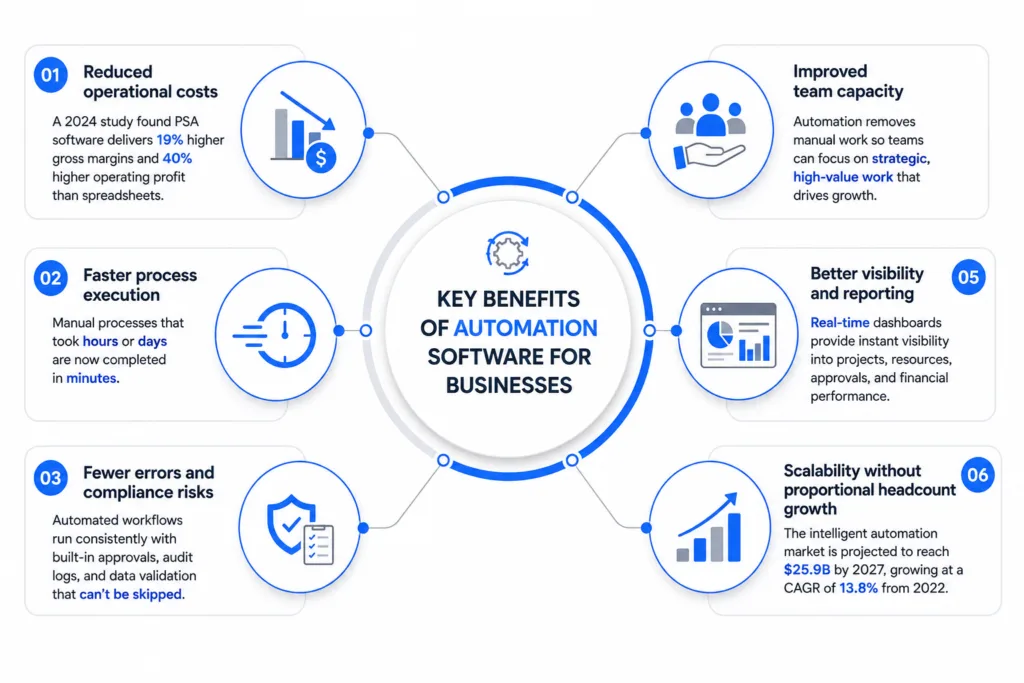
Key Benefits of Automation Software for Businesses
The measurable impact of automation extends across nearly every operational metric. Based on current industry research, here are the primary benefits organizations see after implementation.
Reduced operational costs
A 2024 independent study found that professional services firms using PSA software achieved 19% higher gross margins and 40% higher operating profit than firms relying on spreadsheets. The reduction in manual labor hours and error correction translates directly to cost savings.
Faster process execution
Manual approval chains, data entry, and reporting cycles that previously took hours or days compress to minutes once automated.
Fewer errors and compliance risks
Automated workflows execute consistently every time they run. When compliance steps (approvals, audit logs, data validation) are built into the workflow, they cannot be skipped or forgotten.
Improved team capacity
Automation frees employees to focus on work that requires judgment, creativity, and relationship-building. For lean SME teams, this shift is the difference between being perpetually reactive and having bandwidth for strategic growth.
Better visibility and reporting
Automated systems generate data at every step. Managers get real-time dashboards showing project status, resource utilization, pending approvals, and financial performance without chasing updates from individual team members.
Scalability without proportional headcount growth
The global intelligent process automation market is projected to reach $25.9 billion by 2027, growing at a CAGR of 13.8% from 2022. Teams are investing because automation lets them scale operations without linearly scaling their workforce.
15 Best Automation Software Solutions in 2026
The following comparison covers 15 automation platforms across multiple categories. Each listing includes the tool’s primary strength, pricing, and ideal use case to help you shortlist the right fit for your team.

1. Juntrax
Category: All-in-One Business Automation (PSA + HRMS + Financials)
Best for: SMEs in professional services that want project management, HR, timesheets, invoicing, and financial reporting in a single platform
Pricing: Starting at $5/user/month
Key strengths: Juntrax unifies functions that most teams handle across 3-5 separate tools. The PSA module covers project planning, timesheets, and billing. HRMS handles onboarding, attendance, leave, payroll, and performance. Financial management includes invoicing, expenses, and reporting. Because everything runs on one platform, data flows automatically between modules: billable hours captured in timesheets feed directly into invoicing, and project costs roll into financial reports without manual reconciliation.
Ideal scenario: A 20-100 person professional services firm (IT consulting, creative agency, engineering services) that currently manages projects in one tool, HR in another, and finances in a third, and loses time reconciling data between them.

2. Zapier
Category: Workflow Automation
Best for: Non-technical teams connecting SaaS applications
Pricing: Free plan available; paid plans from $19.99/month (annual)
Key strengths: Connects over 9,000 applications with a no-code trigger-action interface. The largest integration library of any automation platform. Quick to set up for straightforward automation sequences.
Limitations: Charges per action, not per workflow, so costs scale fast with volume. The 750-task cap on Professional means most teams outgrow it within months of serious use.

3. Make (formerly Integromat)
Category: Workflow Automation
Best for: Users who need more complex logic than Zapier provides
Pricing: Free plan (1,000 ops/month); paid plans from $10.59/month
Key strengths: Visual scenario builder with advanced branching, iterations, and error handling. Supports HTTP modules for custom API connections. Consistently 2.5x cheaper than Zapier at equivalent workflow complexity.
Limitations: Steeper learning curve than Zapier. Operations can burn through faster than expected on complex or high-frequency workflows.

4. Microsoft Power Automate
Category: Workflow Automation + RPA
Best for: Organizations already using the Microsoft 365 ecosystem
Pricing: Included with Microsoft 365 (standard connectors); Premium $15/user/month; unattended RPA bots from $150/bot/month
Key strengths: Deep integration with Excel, SharePoint, Teams, Outlook, and Dynamics 365. Covers both cloud-based workflow automation and desktop-based RPA in a single platform.
Limitations: Premium connectors (Salesforce, SAP, custom APIs) require a paid license even if you already have Microsoft 365. Dataverse storage limits fill up faster than most teams expect.

5. UiPath
Category: Robotic Process Automation (RPA)
Best for: Enterprise-scale automation of legacy system processes
Pricing: Community Edition free; Basic $25/month; Enterprise custom (median buyer pays ~$45,675/year)
Key strengths: Industry-leading RPA platform with AI-powered document processing, process mining, and a large developer community. The 2025 expansion into agentic AI (Maestro) now orchestrates bots, AI agents, and human workers from a single interface.
Limitations: Built and priced for enterprise. Requires dedicated personnel to build and maintain bots. Not viable for teams under 200 employees.

6. Monday.com
Category: Project Management with Built-in Automation
Best for: Teams that want automation embedded in their project management workflow
Pricing: Free (2 seats); Basic $9/seat/month; Standard $12/seat/month; Pro $19/seat/month. Three-seat minimum on all paid plans.
Key strengths: Intuitive board-based interface with built-in automation recipes. Good for teams that need project visibility and light automation in one place.
Limitations: Standard caps automation at 250 actions/month, which active teams blow through in the first week. Pro’s 25,000-action limit costs 58% more per seat. The 3-seat minimum means solo users and two-person teams overpay.

7. Jira (Atlassian)
Category: Workflow Automation for Software and IT Teams
Best for: Development teams, IT operations, and service management
Pricing: Free (up to 10 users); Standard $7.91/user/month; Premium $14.54/user/month; Enterprise custom
Key strengths: Highly customizable automation rules for issue tracking, sprint management, and service request workflows. Jira Service Management extends these capabilities to IT service delivery.
Limitations: Most teams pay $20-30/user/month in practice once Marketplace apps, Confluence, and Atlassian Guard are added. Less suited for non-technical department workflows.

8. HubSpot
Category: Marketing, Sales, and Service Automation
Best for: Growth-stage companies looking to automate their revenue operations
Pricing: Free CRM available; Starter $20/seat/month; Marketing Hub Professional $890/month (includes 3 seats and a mandatory $3,000 onboarding fee)
Key strengths: Comprehensive automation across the customer lifecycle: lead scoring, email sequences, deal pipeline management, ticket routing, and customer feedback workflows.
Limitations: The jump from Starter to Professional is steep. Contact overage fees add roughly $45/month per additional 1,000 marketing contacts, which catches fast-growing teams off guard.

9. Kissflow
Category: Business Process Automation
Best for: Mid-market organizations running structured internal workflows at scale
Pricing: Basic $2,500/month flat; Enterprise custom
Key strengths: Low-code platform for designing approval workflows, forms, case management, and process applications. Lets process owners build their own automation without IT involvement.
Limitations: No self-serve trial; requires a sales call first. External portals, SSO, and advanced governance are Enterprise-only, forcing an upgrade for anything beyond internal-only workflows.

10. Automation Anywhere
Category: Enterprise RPA + Agentic Automation
Best for: Large enterprises automating mission-critical processes at scale
Pricing: Cloud Community Edition free; Enterprise pricing on request
Key strengths: Process Reasoning Engine for agentic AI automation. Pre-built AI agents for accounts payable, customer onboarding, and healthcare revenue cycle management. Strong governance and compliance features.
Limitations: Enterprise complexity and pricing. Not designed for SME adoption.
11. Cflow

Category: Business Process Automation
Best for: Mid-sized businesses automating approval workflows and document routing
Pricing: From $12/user/month
Key strengths: Visual workflow builder with pre-built templates for purchase orders, leave requests, travel reimbursements, and vendor management. Integrates with Google Workspace and Microsoft 365.
Limitations: Less suitable for complex multi-system integrations. Smaller integration ecosystem compared to Zapier or Make.

12. n8n
Category: Open-Source Workflow Automation
Best for: Technical teams that want full control over their automation infrastructure
Pricing: Community Edition free (self-hosted, unlimited executions); Cloud from $24/month (2,500 executions)
Key strengths: Open-source and self-hostable, giving teams complete data sovereignty. Charges per workflow execution rather than per action, making it dramatically cheaper than Zapier for complex workflows. Supports custom JavaScript and Python nodes.
Limitations: Requires technical knowledge to self-host. The Cloud free tier was removed in 2025; Cloud now starts at $24/month.

13. Airtable
Category: Low-Code Database + Workflow Automation
Best for: Teams that need a flexible database with built-in workflow automation
Pricing: Free (5 editors, 1,000 records); Team $20/seat/month (50,000 records, 25,000 automation runs); Business $45/seat/month
Key strengths: Combines a spreadsheet-like interface with database functionality, API integrations, and automation triggers. Multiple views (grid, Kanban, Gantt, calendar) make it flexible across use cases.
Limitations: The jump from Team to Business is a 125% per-seat price increase. Hitting the 50,000-record cap forces an immediate upgrade.

14. Pipefy
Category: Business Process Automation
Best for: Operations teams standardizing repetitive workflows (procurement, hiring, IT requests)
Pricing: Free (10 users, 5 processes); Business $25/user/month; Enterprise $30/user/month
Key strengths: Kanban-style process management with built-in email automation, conditional logic, SLA tracking, and AI Co-pilot for building workflows. Pre-built templates for HR, finance, and IT workflows.
Limitations: Per-user pricing scales poorly across multiple departments. Some users find the per-USD pricing expensive in non-US markets.

15. Lindy
Category: AI-Powered Agentic Automation
Best for: Teams deploying AI agents for email management, CRM prep, and research
Pricing: Free (400 credits/month); Pro $49.99/month (1,500 credits); Enterprise from $199.99/month
Key strengths: Build AI agents in plain language. Supports 5,000+ integrations, multiple AI models (GPT, Claude, Gemini), and Agent Swarms for coordinating multiple agents across departments.
Limitations: AI agents deliver roughly 85-90% reliability vs 99%+ for rule-based tools. Credit-based pricing makes monthly costs harder to forecast.
How to Choose the Right Automation Software: The 5-Question Readiness Assessment
Before comparing feature lists, run through this assessment to clarify what your organization actually needs.
Question 1: What are you trying to automate?
Map your automation targets by department and process type. A company that needs to automate invoice approvals, leave requests, and project time tracking has different requirements than one that needs to sync marketing leads across five SaaS tools.
Start by listing every manual process that consumes more than two hours per week. Rank them by the combination of time consumed and error frequency. The processes at the top of that list are your first automation candidates.
Question 2: How many systems need to talk to each other?
If your primary challenge is connecting disparate applications (CRM, email, accounting, project management), you need a workflow automation or iPaaS tool. If your challenge is that a single process (like onboarding or procurement) involves too many manual steps and handoffs, a BPA or all-in-one platform is a better fit.
Organizations using 5+ disconnected SaaS tools often benefit most from consolidating to an all-in-one platform like Juntrax, which removes integration complexity entirely by housing HRMS, PSA, and Financials under one roof.
Question 3: What is your team’s technical capacity?
RPA platforms and open-source tools like n8n offer maximum flexibility, but they require developers or technically skilled administrators to build and maintain automations. No-code platforms like Zapier and Kissflow let business users build workflows independently. All-in-one platforms with built-in automation (Juntrax, Monday.com) require the least technical overhead because the workflows are pre-configured around common business processes.
Question 4: What is your actual budget, including hidden costs?
Subscription price is only part of the total cost. Factor in these frequently overlooked expenses when comparing platforms.
Implementation and configuration costs, including the time your team spends setting up workflows, mapping processes, and migrating data. For complex tools, this can exceed the first year of subscription fees.
Integration and middleware costs, since connecting tools that were not designed to work together often requires additional middleware, custom API development, or a separate iPaaS subscription.
Training and change management time, because every new tool requires your team to learn new processes. Consolidating to fewer platforms reduces this overhead.
Ongoing maintenance, since automations break when connected applications update their APIs or change their interfaces. Someone on your team needs to monitor and fix these.
Question 5: Do you need a point solution or a platform?
This is the most consequential decision. If you automate marketing emails with HubSpot, project workflows with Monday.com, HR processes with BambooHR, and invoicing with QuickBooks, you gain automation within each silo, but you also create new integration challenges between those silos.
For SMEs that need automation across HR, project management, and finance, a unified platform like Juntrax often delivers better total value because it eliminates the integration layer entirely. Larger enterprises with existing tool ecosystems typically benefit more from a combination of specialized tools connected through workflow automation or iPaaS.
Automation Software by Department: Where to Start
Deciding which department to automate first depends on where the manual overhead is highest relative to the team size. Here is a practical mapping of automation priorities by function.
Human Resources
HR departments handle a high volume of structured, repetitive processes: onboarding paperwork, leave approvals, attendance tracking, payroll calculations, and performance review cycles. Automating these tasks removes administrative burden from HR teams while also improving the employee experience through faster response times.
Recommended tools: Juntrax HRMS (comprehensive HR automation including onboarding, attendance, leave, payroll, reimbursements, and performance management), BambooHR (mid-market HR), or Rippling (HR + IT management).
Finance and Accounting
Invoice generation, expense approvals, payment tracking, revenue recognition, and financial reporting are all strong candidates for automation. Finance teams that still rely on spreadsheets for these functions lose time to manual data entry and increase the risk of calculation errors.
Recommended tools: Juntrax Financial Management (for SMEs that want invoicing, expenses, and reporting integrated with project and HR data), QuickBooks (standalone accounting), or Xero (cloud accounting with strong automation).
Project Management
Automating task assignments, status updates, deadline notifications, timesheet collection, and resource allocation reduces the administrative overhead of project delivery. For professional services firms, the connection between project time tracking and billing is especially valuable to automate, since missed billable hours directly impact revenue.
Recommended tools: Juntrax PSA (project management, timesheets, and billing in one module), Jira (software development teams), Monday.com (general project management), or Asana (collaborative task management).
Marketing
Marketing automation covers email sequences, lead nurturing, social media scheduling, campaign analytics, and CRM synchronization. Automating these workflows ensures that leads receive timely follow-ups and that campaign data flows into reporting without manual exports.
Recommended tools: HubSpot (comprehensive marketing automation), Mailchimp (email-focused), ActiveCampaign (email + CRM), or Zapier/Make (connecting marketing tools to the rest of your stack).
IT Operations
IT automation addresses server provisioning, patch management, ticket routing, user provisioning, access control, and incident response. For growing companies, automating IT operations becomes critical as the number of users, devices, and systems exceeds what a small IT team can manage manually.
Recommended tools: Jira Service Management (IT service desk), Power Automate (Microsoft environment), n8n (custom IT workflows for technical teams), or Zenphi (Google Workspace automation).
Implementation Roadmap: From Evaluation to Full Deployment
Automating your business processes is a phased effort, not a single switch to flip. This roadmap provides a realistic timeline for SMEs implementing automation software for the first time.
Phase 1: Audit and Prioritize (Weeks 1-2)
Document every manual process across your organization. For each, record the time it consumes per week, the number of people involved, the error frequency, and the business impact of those errors.
Prioritize by impact: processes that consume the most time or produce the most costly errors should be automated first.
During this phase, also inventory your current software stack. List every tool each department uses, note which tools share data (and how), and identify where manual data transfer currently bridges gaps between systems.
Phase 2: Select and Configure (Weeks 3-5)
Based on your audit, evaluate platforms that address your highest-priority automation needs. Request demos or free trials from 2-3 shortlisted vendors. During evaluation, test each platform against your actual processes rather than abstract feature lists.
Configure your first automation workflows during this phase, starting with the 2-3 highest-impact processes identified in Phase 1. Keep these initial automations simple and focused. You can add complexity later once the team is comfortable with the platform.
Phase 3: Pilot and Train (Weeks 6-8)
Run your initial automations in parallel with existing manual processes for at least two weeks. This allows you to validate that the automation produces correct outputs and catches edge cases before you fully retire the manual process.
Conduct training sessions with every team member who will interact with the automated workflows. Focus on practical walkthroughs rather than abstract feature demonstrations.
Phase 4: Expand and Optimize (Months 3-6)
After the pilot period, begin automating the next tier of prioritized processes. At this stage, you should also start connecting automations across departments, such as linking project time tracking to invoice generation, or employee onboarding to IT provisioning and payroll setup.
Review performance metrics monthly: time saved, error rates, user adoption, and any automation failures or exceptions. Use this data to refine existing workflows and prioritize the next batch of automations.
Common Mistakes When Implementing Automation Software
Even well-chosen tools can underperform if the implementation ignores these frequent pitfalls.
Automating broken processes: If your current approval chain is unnecessarily complex or your data entry forms collect irrelevant information, automating those processes will simply execute the dysfunction faster. Audit and streamline the process before automating it.
Buying more tools than necessary: Every additional tool adds integration complexity, training overhead, and subscription cost. For SMEs especially, consolidating to an all-in-one platform often delivers more value than assembling a stack of best-of-breed point solutions.
Underestimating change management: Automation changes how people work. Without clear communication about why processes are changing and how the new workflows operate, teams will resist adoption or find workarounds that undermine the automation.
Neglecting ongoing maintenance: Automations require monitoring. API changes, new edge cases, and evolving business requirements mean your workflows will need periodic updates. Assign ownership for automation maintenance to a specific person or team.
Trying to automate everything at once: Starting with too many automations simultaneously increases the risk of errors, overwhelms the team, and makes it difficult to troubleshoot issues. Begin with 2-3 high-impact automations and expand methodically.
Automation Software Pricing: What to Expect in 2026
Pricing models across automation software vary significantly. Here is a summary of what the platforms in this guide charge, organized by category, to help you budget accurately.
| Category | Tool | Starting Price | Pricing Model |
|---|---|---|---|
| All-in-One (PSA/HRMS/Finance) | Juntrax | $8/user/month | Per user |
| Workflow Automation | Zapier | Free / $19.99/mo (annual) | Usage-based (tasks/month) |
| Workflow Automation | Make | Free / $10.59/mo | Usage-based (operations/month) |
| Workflow Automation | Power Automate | Free (M365) / $15/user/month | Per user / per bot |
| RPA | UiPath | Free Community / $25/mo Basic | Per bot / enterprise license |
| RPA | Automation Anywhere | Free Community / Custom | Per bot / enterprise license |
| Project + Automation | Monday.com | Free / $9/seat/mo (3-seat min) | Per seat |
| Project + Automation | Jira | Free / $7.91/user/mo | Per user |
| BPA | Kissflow | $2,500/month | Platform license (flat fee) |
| BPA | Cflow | $12/user/month | Per user |
| BPA | Pipefy | Free / $25/user/mo | Per user |
| Marketing Automation | HubSpot | Free CRM / $890/mo (Pro) | Tiered by contacts + features |
| Low-Code + Database | Airtable | Free / $20/seat/mo | Per seat |
| Open-Source Automation | n8n | Free (self-host) / $24/mo | Self-hosted or execution-based |
| AI Agent Automation | Lindy | Free / $49.99/mo | Credit-based |
When comparing pricing, remember that the cheapest per-user cost is not always the most economical choice. A company paying $5/user/month for Juntrax’s all-in-one platform may spend less overall than a company paying $8 for Jira + $12 for BambooHR + $30 for QuickBooks + $30 for Zapier to connect them all.
Getting Started
The most effective approach to automation is starting with your biggest bottleneck, selecting the minimum number of tools needed to address it, and expanding from there. For SMEs in professional services, this often means consolidating HR, project management, and finance automation into a single platform before adding specialized tools for marketing or IT operations.
If your organization currently manages business operations across 3-5 disconnected tools and you want to see what unified automation looks like in practice, start a free trial of Juntrax to explore how HRMS, PSA, and Financial Management work together on one platform.
Frequently Asked Questions
What is automation software?
Automation software is any technology platform that executes tasks or processes automatically based on predefined rules, triggers, or AI-driven decisions. These tools range from simple connectors between applications to full-scale enterprise platforms that handle document processing, decision-making, and cross-system orchestration.
What are the main types of automation software?
The five primary categories are workflow automation (connecting applications through triggers and actions), business process automation (streamlining end-to-end processes like approvals and onboarding), robotic process automation (software bots that interact with application interfaces), integration platforms (iPaaS for data synchronization), and intelligent automation (AI-powered tools for document processing and decision-making).
How much does automation software cost for small businesses?
Costs range widely. Entry-level workflow automation starts free (Zapier, Make, n8n). All-in-one business platforms like Juntrax start at $5/user/month. Dedicated BPA tools range from $12-$2,500/month. Enterprise RPA platforms require custom pricing, typically starting at several thousand dollars per month.
Which automation software is best for SMEs?
The best choice depends on the scope of what you need to automate. For professional services firms that need to automate HR, project management, and finance together, all-in-one platforms like Juntrax offer the best total value by consolidating multiple functions under one subscription. For teams that primarily need to connect existing SaaS tools, Zapier or Make are the most accessible starting points.
Can automation software replace employees?
Automation changes the nature of work rather than eliminating it entirely. Research from multiple sources indicates that automation creates new roles (automation analysts, workflow designers, data quality managers) while reducing demand for repetitive manual tasks. Organizations that implement automation typically redeploy freed-up capacity toward higher-value activities rather than reducing headcount.
How long does it take to implement automation software?
For SMEs, a phased implementation typically takes 6-8 weeks from initial audit to the first production-ready automations. Simple workflow automations (Zapier, Make) can be set up in hours. Complex enterprise deployments (UiPath, Automation Anywhere) can take 3-6 months or longer.
What is the difference between RPA and BPA?
RPA automates tasks by mimicking human interactions with software interfaces (clicking, typing, copying). BPA automates the broader business process itself, including routing, approvals, escalations, and handoffs between people and systems. RPA is task-level automation; BPA is process-level automation. Many organizations use both in combination.
Is automation software secure?
Reputable automation platforms include security features such as encryption, role-based access controls, audit logs, SOC 2 compliance, and SSO integration. When evaluating platforms, verify their security certifications, data residency options, and access control granularity, especially if your organization handles sensitive customer or financial data.