
By the time most small businesses look for “business management software,” they already own too many tools. The average SMB now pays for somewhere between 8 and 16 SaaS subscriptions, according to recent industry surveys, and the typical 10-person team spends $400 to $700 a month just on the workflow stack. The problem rarely reads as “we need another tool.” It reads as “our customer data lives in three places, payroll runs through a spreadsheet, and project timesheets never reach the invoice.”
This guide is built for that situation. We reviewed more than 40 platforms across all-in-one suites, project management, accounting, HR, and CRM, then narrowed the shortlist to 15 that hold up for small and mid-sized businesses in 2026. Each entry includes who it’s built for, what it actually costs, where it falls short, and whether it makes sense as a single tool or as part of a leaner stack.
If you run a service-based business (an agency, consultancy, professional services firm, or IT services company), several sections are written with you specifically in mind. If you sell products, manage inventory, or run a retail operation, you’ll find tools tagged for that path too.
What is small business management software?
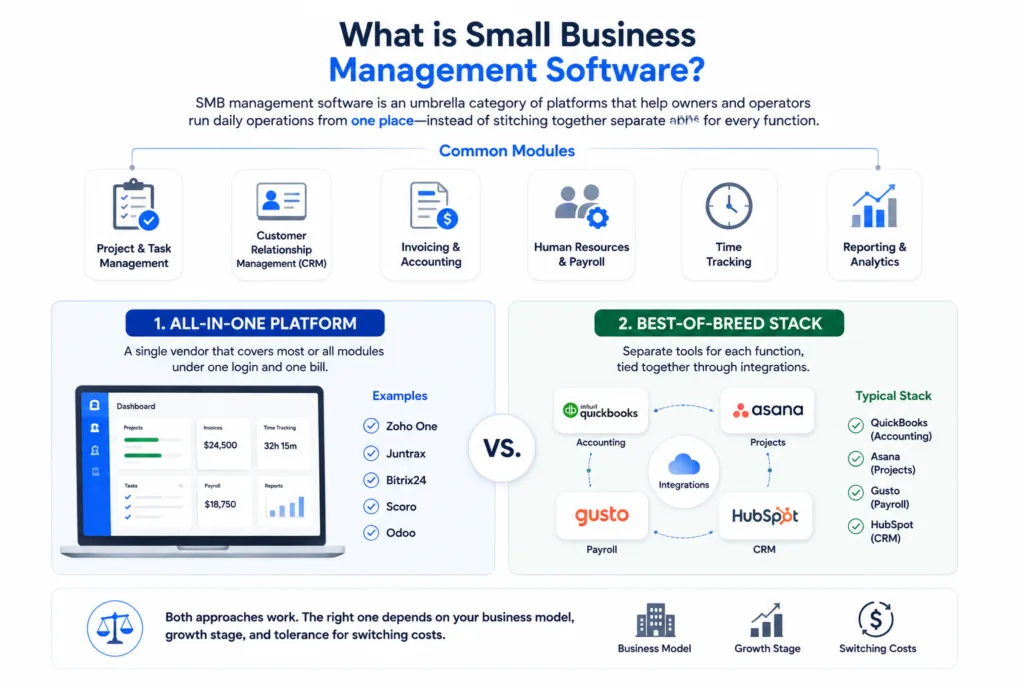
Small business (or SMBs) management software is an umbrella category for platforms that help owners and operators run daily operations from one place, instead of stitching together separate apps for every function. The common modules include project and task management, customer relationship management (CRM), invoicing and accounting, human resources and payroll, time tracking, and reporting.
The category splits roughly into two shapes. The first is the all-in-one platform: a single vendor that covers most or all of those modules under one login and one bill. Examples include Zoho One, Juntrax, Bitrix24, Scoro, and Odoo. The second is the best-of-breed stack: separate tools for each function, tied together through integrations. A typical best-of-breed stack might pair QuickBooks for accounting, Asana for projects, Gusto for payroll, and HubSpot for CRM.
Both approaches work. The right one depends on your business model, growth stage, and tolerance for switching costs.
All-in-One or Best-of-Breed: Which Path Fits You?
Most buying guides skip this question, which is the most important one you’ll answer.
All-in-one platforms make sense when:
- Your team is under 50 people and you don’t have dedicated specialists for accounting, HR, or sales operations
- You want one source of truth across projects, people, and finance
- You’re tired of integration breakages and reconciling data between tools
- Your processes are still settling and you want flexibility without committing to a deep specialist tool
- You bill clients based on time, projects, or services (where HR, projects, and invoicing need to be connected)
Best-of-breed stacks make sense when:
- You have specialist needs (heavy inventory management, complex multi-state payroll, advanced sales pipelines)
- You already have power users who know specific tools and would resist switching
- Your team is large enough that each department can own its own platform
- You’re in a regulated industry where one specialist tool is the standard (legal, healthcare, finance)
- You’re comfortable managing 5+ integrations and the occasional sync failure
For service-based SMBs under 100 employees, all-in-one platforms generally win on total cost and operational simplicity. For product businesses with inventory or regulated industries, best-of-breed usually pays off.
How we evaluated these tools
Every shortlist on the SERP includes the same names, so the value of a review is in the criteria, not the list. We weighted:
- Fit for SMBs (1 to 100 employees), not enterprise-first products dressed down
- Pricing transparency, with public per-user pricing and no opaque “contact sales” tiers for entry plans
- Real implementation cost, including setup time, training, and migration friction
- Integration ecosystem, since few SMBs run on one tool alone
- AI features in 2026, including assistants, automation, and reporting
- Customer reviews on G2, Capterra, and TrustRadius, weighted for SMB respondents
- Roadmap signal, including how active the product looks and whether it’s investing in modern infrastructure
We excluded tools targeted at enterprises ($100K+ ACV), tools with no English-language support, and tools below a 4.0 rating average across major review sites.
Quick comparison: 15 best small business management software in 2026
| # | Software | Best for | Starting price | Free plan | Free trial | AI features |
| 1 | Juntrax | Service-based SMBs (HR + projects + financials) | ~$5 to $7/user/month | No | Yes (14 days) | Reporting assistance |
| 2 | Zoho One | Established SMBs wanting a 40+ app suite | ~$37/user/month (all employees) | No | Yes (30 days) | Zia AI across apps |
| 3 | Bitrix24 | Very small teams wanting a free all-in-one | Free | Yes (unlimited users) | Yes | CoPilot assistant |
| 4 | Scoro | Agencies and consultancies | ~$26/user/month | No | Yes (14 days) | Reporting and forecasting |
| 5 | Odoo | Product-based SMBs with inventory | Free for one app, ~$25/user/month full | Yes (one app) | Yes (15 days) | AI assistant (rolling out) |
| 6 | ClickUp | Power users who want one workspace | Free; paid from ~$7/user/month | Yes | Yes | Brain (built-in AI) |
| 7 | monday.com | Visual collaboration across teams | ~$9/user/month (3-seat minimum) | Limited free | Yes | monday AI |
| 8 | Asana | Cross-functional task management | Free; paid from ~$10.99/user/month | Yes (up to 10 users) | Yes | Asana AI |
| 9 | QuickBooks Online | US-based accounting | ~$35/month | No | Yes (30 days) | AI categorization, anomaly detection |
| 10 | Xero | Global cloud accounting | ~$25/month | No | Yes (30 days) | Just Ask Xero |
| 11 | FreshBooks | Freelancers and solo services | ~$19/month | No | Yes (30 days) | Smart insights |
| 12 | Gusto | US payroll and benefits | ~$49/month + ~$6/employee | No | One-month bundle offer | Gusto AI (beta) |
| 13 | BambooHR | Growing HR teams | Custom quote (per-employee) | No | Yes | Ask BambooHR (beta) |
| 14 | HubSpot CRM | Free CRM with growth paths | Free; paid from ~$15/seat/month | Yes | Yes | Breeze AI |
| 15 | Capsule CRM | Simple relationship-led CRM | Free for 2 users; paid from ~$18/user/month | Yes (2 users) | Yes | AI Email Assist, Summaries |
All-in-one platforms for SMBs

1. Juntrax: Best for service-based SMBs needing HR, projects, and financials in one
Juntrax is a cloud-based business management platform built specifically for service-based small and mid-sized enterprises. It combines three modules that service businesses normally have to buy separately: Human Resource Management (HRMS), Professional Services Automation (PSA), and Financials. Because the modules share one data layer, a timesheet logged against a project automatically flows into the client invoice and the employee’s billable utilization report.
Best for: Agencies, consultancies, IT services firms, engineering services, architectural firms, and staffing companies with 5 to 100 employees who currently juggle separate tools for HR, timesheets, projects, and invoicing.
Key features:
- HRMS with attendance, leave, payroll, reimbursements, performance, and asset tracking
- PSA with project management, timesheets, billing, and resource allocation
- Financial module covering sales, purchases, expenses, and reporting
- Multi-location support for distributed and global teams
- Role-based access controls and audit trails
Pros: Native integration between time-tracking, projects, and invoicing removes a major source of revenue leakage for service businesses. Pricing is competitive for the depth of functionality. Built specifically for SMBs rather than scaled down from enterprise software.
Cons: Not built for product-based or inventory-heavy businesses. Smaller integration marketplace than Zoho or Odoo. Brand recognition is lower than the household names on this list.
Pricing: Starts at approximately $5 to $7 per user per month, with a 14-day free trial.
Who this isn’t for: Retailers, manufacturers, e-commerce operators, or freelancers running a one-person shop where a full HRMS would be overkill.

2. Zoho One: Best for established SMBs wanting a 40+ app suite
Zoho One bundles more than 40 business applications under a single subscription, covering CRM, finance (Books, Invoice, Expense), HR (People, Recruit), project management (Projects), marketing automation, customer support, and operations. The breadth is the headline feature, and Zia, Zoho’s AI layer, runs across most apps for predictions, anomaly detection, and natural-language queries.
Best for: SMBs of 20 to 500 employees with at least one tech-savvy admin who can configure across apps and is willing to commit to one vendor for most operations.
Key features:
- Over 40 integrated apps covering most business functions
- Zia AI assistant across the suite
- Strong customization with low-code Creator platform
- Unified user management and SSO
Pros: Unmatched breadth at the price point. Apps are individually competitive (Zoho CRM ranks well on its own). Strong customization for specific workflows.
Cons: Steep learning curve given the surface area. Some apps feel less polished than dedicated competitors (HR module is improving but trails BambooHR). Requires admin commitment to get value from the breadth.
Pricing: Around $37 per user per month when all employees are licensed (annual billing), or about $90 per user per month for select-employee licensing. 30-day free trial.
Who this isn’t for: Teams under 10 people who only need one or two modules; you’ll pay for capacity you won’t use.

3. Bitrix24: Best free all-in-one for very small teams
Bitrix24 offers an unusually generous free plan covering CRM, tasks, project management, document storage, video calls, and a company intranet. Paid plans add automation depth, more storage, and advanced reporting. It is one of the few all-in-one platforms that delivers genuine functionality on the free tier.
Best for: Bootstrapped teams of 1 to 12 people who want a single tool for CRM, projects, and internal communication without a recurring bill.
Pros: Free plan supports unlimited users (with feature caps). Strong CRM and task management out of the box. Built-in chat and video calls reduce the need for a separate Slack or Zoom subscription.
Cons: The interface can feel crowded; users routinely mention a learning curve. Reporting on free and lower-paid tiers is limited. Some advanced features sit behind enterprise-only plans.
Pricing: Free plan available; paid plans start around $49 per month flat (not per user) for the Basic tier with 5 users.
Who this isn’t for: Teams that prize a clean, minimal UI; Bitrix24 is feature-dense by design.

4. Scoro: Best for agencies and consultancies
Scoro is purpose-built for agencies, consultancies, and professional services firms that bill projects, track utilization, and need real-time profitability data. It combines project management, time tracking, CRM, quoting, invoicing, and reporting in one platform, with a focus on visibility into project margins.
Best for: Agencies and consultancies of 10 to 150 employees that bill clients by project or retainer and need profitability reporting tied to time data.
Pros: Strong project profitability reporting. Quote-to-invoice flow is well integrated. Designed for billable teams rather than retrofitted from generic PM software.
Cons: Pricing is on the higher end for SMBs. Requires onboarding and process discipline to get full value. Less suitable for teams that don’t bill by project.
Pricing: Starts around $26 per user per month (annual billing), with a minimum seat count on higher tiers.
Who this isn’t for: Product businesses, e-commerce, or service teams that don’t track utilization or bill by time.

5. Odoo: Best for product-based SMBs with inventory
Odoo is an open-source business management platform with modular apps spanning inventory, manufacturing, point-of-sale, e-commerce, CRM, accounting, and HR. The community edition is free; the enterprise edition adds support, hosting, and premium modules.
Best for: Product-based SMBs, manufacturers, retailers, and e-commerce operators that need inventory and operations tightly integrated.
Pros: Genuine depth for inventory, manufacturing, and product workflows. Modular pricing lets you start with one or two apps and add more. Open-source flexibility for customization.
Cons: Implementation typically requires a partner or in-house developer. Self-hosted deployments shift more responsibility to you. The user interface, while improved, can feel dated compared to newer SaaS competitors.
Pricing: One app free for life; full suite starts around $25 per user per month for Odoo Enterprise (Standard plan).
Who this isn’t for: Pure service businesses without inventory; the strength of Odoo is wasted there.
Project and work management tools

6. ClickUp: Best for power users who want one workspace
ClickUp positions itself as “one app to replace them all,” with tasks, docs, goals, whiteboards, chat, and dashboards in a single workspace. The breadth and customization are extreme, which is a strength for power users and a hurdle for casual ones. ClickUp Brain, its built-in AI, summarizes work and drafts content across the workspace.
Best for: Teams led by an operations-minded admin who will configure ClickUp for the team’s specific workflow rather than living in the defaults.
Pros: Highly customizable views (list, board, calendar, Gantt, timeline). Free plan is generous. AI features are integrated rather than bolted on.
Cons: Cognitive load is real; new users often feel lost. Performance has historically been a complaint, though it has improved. Some teams over-configure and end up with a more complex system than the one they replaced.
Pricing: Free plan available; paid plans start around $7 per user per month (annual).

7. monday.com: Best for visual collaboration across teams
monday.com is the visual project and work management platform that most teams find easiest to adopt. Its strength is the colorful, board-driven interface that non-technical users grasp quickly, plus a deep automation engine and a growing app marketplace.
Best for: Cross-functional teams that need a shared view of work without forcing every user to learn a complex tool.
Pros: Fast adoption across non-technical teams. Strong automations and dashboards. Wide template library for common workflows.
Cons: Pricing climbs quickly as you add seats and features. The three-seat minimum makes it awkward for very small teams. Some advanced functionality is gated to higher tiers.
Pricing: Around $9 per user per month for the Basic plan (3-seat minimum, annual billing), with mid and pro tiers priced higher.

8. Asana: Best for cross-functional task management
Asana focuses on task and project management with a clean interface, strong dependency mapping, and goal-tracking tied to work. It handles complex projects well without requiring the configuration overhead of ClickUp.
Best for: Mid-sized SMBs and team leads who need reliable task management and goal alignment across departments.
Pros: Mature product with strong stability. Goals feature ties strategic objectives to day-to-day work. Free tier supports up to 10 users.
Cons: Lacks native time tracking and invoicing, so service businesses still need other tools alongside. Advanced reporting requires higher tiers.
Pricing: Free for up to 10 users; paid plans start around $10.99 per user per month (annual).
Accounting and finance tools

9. QuickBooks Online: Best for US-based small business accounting
QuickBooks Online remains the default choice for US small business accounting, with the deepest accountant network, the widest integration ecosystem, and AI features that catch anomalies and categorize transactions automatically.
Best for: US-based SMBs that want their accountant or bookkeeper to be familiar with the software from day one.
Pros: Massive accountant familiarity, which lowers handoff friction. Strong integration ecosystem. Continuous AI improvements (Report Insights, Anomaly Detection).
Cons: Pricing has increased steadily over recent years. Higher tiers required for inventory and full payroll. Some users report friction when scaling beyond mid-market complexity.
Pricing: Plans start around $35 per month, climbing for inventory, multi-currency, and full-service payroll.

10. Xero: Best for global cloud accounting
Xero is the most popular cloud accounting platform outside the US, with strong presence in the UK, Australia, New Zealand, Canada, and Europe. It offers unlimited users on every plan, which is unusual for accounting software.
Best for: SMBs outside the US, or US-based businesses with international operations or accountants who prefer Xero.
Pros: Unlimited users on every plan, which removes a common cost trap. Clean, modern interface. Strong international payment and currency support.
Cons: US payroll is less mature than QuickBooks. Some inventory features lag specialist tools.
Pricing: Early plan starts around $25 per month, with promotional discounts often available for new accounts.

11. FreshBooks: Best for freelancers and solo service businesses
FreshBooks started as invoicing software for freelancers and has expanded into a light accounting and project tracking platform for service-based solopreneurs and very small teams.
Best for: Freelancers, consultants, and one-to-five-person service businesses focused on billing clients and tracking time.
Pros: Easiest invoicing experience among accounting tools. Built-in time tracking flows directly into invoices. Mobile app is well regarded.
Cons: Accounting depth is lighter than QuickBooks or Xero. Pricing scales by client count on lower tiers, which can sneak up on growing businesses.
Pricing: Lite plan starts around $19 per month.
HR and payroll tools

12. Gusto: Best for US payroll and benefits
Gusto handles US payroll, benefits, and basic HR for small businesses, with a reputation for the cleanest interface in the category. Tax filings, year-end forms, and benefit administration are automated where possible.
Best for: US SMBs with one to a few hundred employees who want payroll handled correctly without paying enterprise prices.
Pros: Modern, friendly interface. Integrated benefits and tax filing. Strong customer reviews on support.
Cons: US-only for payroll. Higher-tier features (advanced HR, hiring tools) priced separately.
Pricing: Simple plan starts around $49 per month plus $6 per employee per month.

13. BambooHR: Best for growing HR teams
BambooHR is the dedicated HR platform for SMBs that have outgrown spreadsheets and need a real system for employee records, onboarding, performance reviews, and reporting.
Best for: US SMBs of 25 to 1,000 employees with a dedicated HR person or team.
Pros: Strong HR depth, including performance management and onboarding workflows. Clean reporting and analytics. Mobile app for employees.
Cons: Pricing is by quote, which obscures comparison. US-focused. Payroll add-on is US-only.
Pricing: Quote-based; expect roughly $6 to $10 per employee per month depending on tier.
CRM tools
14. HubSpot CRM: Best free CRM with growth paths
HubSpot CRM offers a genuinely useful free tier covering contact management, deal pipelines, email tracking, and basic reporting. The paid Sales, Marketing, and Service Hubs scale into a full revenue platform as you grow.
Best for: SMBs that want to start free and have room to grow into marketing automation, sales enablement, or customer service tools without changing platforms.
Pros: Free tier is genuinely useful, not a teaser. The path to scale is clear if your needs grow. Breeze AI features (across content, prospecting, and customer service) are improving quickly.
Cons: Paid tiers escalate sharply once you cross the threshold features. Contact-based pricing on marketing tools can become expensive.
Pricing: Free; paid tools start around $15 per seat per month, with much higher tiers for marketing and sales automation.

15. Capsule CRM: Best simple relationship-led CRM
Capsule CRM is the lightweight, low-friction CRM option for small teams that want structure without the complexity of HubSpot or Salesforce. It covers contacts, pipelines, tasks, and a small project module with a clean interface.
Best for: Small service businesses and consultancies under 25 people that want a usable CRM without a long onboarding.
Pros: Free for up to 2 users. Genuinely simple interface. Useful integrations with Xero, QuickBooks, Mailchimp, and Microsoft.
Cons: Lighter on marketing automation than HubSpot. Less depth for sales-heavy operations than Pipedrive or Salesforce.
Pricing: Free for 2 users; paid plans start around $18 per user per month.
How to choose: a 6-step decision framework
Use this in order. Skipping steps is the most common reason teams buy the wrong tool.
Step 1: Document your current stack and cost
List every tool the business pays for, the seat count, and the monthly cost. Most teams discover $200 to $500 of redundancy in this step alone.
Step 2: Identify your top 3 friction points
These are the workflows that cost the most time or cause the most errors. Common examples include: timesheets that don’t reach invoices, customer data scattered across email and spreadsheets, payroll handled manually, project profitability invisible until month-end.
Step 3: Decide all-in-one or best-of-breed
Use the framework earlier in this guide. Service businesses under 50 employees usually win with all-in-one; product or regulated businesses usually win with best-of-breed.
Step 4: Shortlist 3 tools per friction point
Don’t shortlist 10. Three forces a real decision.
Step 5: Run trials with real data
A 30-minute demo tells you almost nothing. A two-week trial with your actual contacts, invoices, and projects loaded in tells you everything.
Step 6: Calculate true total cost
Include subscription cost, expected setup time (in hours, valued at internal rates), data migration cost, and ongoing maintenance. The cheapest tool by sticker price is rarely the cheapest by TCO.
What does a typical SMB stack cost?
Most published comparisons stop at per-tool pricing, which underestimates the real cost. Here is what a 10-person service business typically spends on a workflow stack today:
Best-of-breed stack (example):
- QuickBooks Online (Plus, 5 users): ~$99/month
- Asana (Business, 10 seats): ~$250/month
- HubSpot CRM (Starter, 2 paid seats): ~$30/month
- Gusto (Simple, 10 employees): ~$109/month
- Slack (Pro, 10 seats): ~$72/month
- Subtotal: ~$560/month, or $6,720/year
All-in-one stack (example):
- Juntrax (10 users at ~$6): ~$60/month
- Standalone accounting if needed (Xero Growing): ~$47/month
- Subtotal: ~$107/month, or ~$1,284/year
The difference is substantial, though it isn’t apples-to-apples. The best-of-breed stack often offers more depth in each category, while the all-in-one trades some specialist depth for integration and price. The right answer depends on whether that specialist depth is doing real work for your business. For many service SMBs, the answer is no.
What buying software actually costs you
Vendors rarely advertise implementation cost honestly.
Here are rough timelines based on customer reports and industry benchmarks:
- Accounting software switch: 2 to 6 weeks for a clean migration, longer if you have a multi-year history to import. Plan for an accountant’s involvement.
- HR platform setup: 1 to 3 weeks for employee records, policies, and time-off rules. Payroll switches mid-year complicate this further.
- CRM setup: 1 week to set up cleanly, 3 to 6 months to actually have the team using it well.
- Project management: 2 days to set up, 4 to 8 weeks for the team to settle into a working pattern.
- All-in-one platform: 3 to 8 weeks to migrate from multiple existing tools, depending on data complexity.
Two principles save teams from regret. First, sequence the rollout (accounting, then HR, then projects, then CRM) instead of switching everything at once. Second, assume the first tool you buy will be wrong for at least one workflow; build switching cost into your purchasing thinking from day one.
AI features to look for in 2026
AI is the headline feature on every major platform’s 2026 roadmap. The features that genuinely save time fall into four buckets:
- Transaction and data categorization (QuickBooks, Xero): Automatic coding of bank transactions and expenses with accuracy now in the 90% range.
- Reporting assistants (Zoho Zia, Xero’s Just Ask Xero, ClickUp Brain): Natural-language queries that pull reports without learning a query builder.
- Draft and summarization (Capsule’s AI Email Assist, HubSpot Breeze, monday AI): Drafts follow-ups, summarizes long contact histories, or condenses meeting notes into next steps.
- Anomaly and risk detection (QuickBooks anomaly detection, Gusto’s payroll checks): Flags duplicates, unusual spend patterns, and compliance risks before they become problems.
What to be skeptical of: AI features that promise full autonomy. The current generation of business software AI is best at first drafts and pattern detection, not at executing decisions without review.
Common mistakes when buying small business software
Five mistakes show up repeatedly in post-purchase regret:
- Buying for the team you want, not the team you have. A 5-person business doesn’t need Salesforce. Buy for current scale plus 6 to 12 months of likely growth.
- Paying for features your team won’t adopt. Industry data suggests SMBs use 20% to 30% of the features they pay for. Match the tool to actual workflows, not future ambitions.
- Skipping the integration check. A tool that doesn’t talk to your accounting or email creates more work, not less. Validate integrations during the trial.
- Underestimating switching cost. Annual contracts, data migration, and team retraining add up. Build a realistic switching budget before committing.
- Treating price as the only variable. Cheap tools that lose you an hour a week cost more than expensive tools that save you five. Calculate time costs alongside subscription costs.
How Juntrax compares for service-based SMBs
For full transparency: this guide is published by Juntrax, so it is worth being explicit about where Juntrax fits and where other tools win.
Juntrax is the right call when:
- You run a service business (agency, consultancy, IT services, engineering, architecture, staffing)
- Your team is 5 to 100 people
- Your biggest workflow pain is timesheets, projects, HR, and invoicing not talking to each other
- You want a single bill instead of five
- Your budget for a unified platform is $5 to $10 per user per month
Other tools win when:
- You sell products with inventory (Odoo is a better fit)
- You need deep US payroll and benefits (Gusto, with QuickBooks for accounting)
- You’re a US-based business where your accountant insists on QuickBooks Online
- You’re a one-person freelancer (FreshBooks plus a simple CRM is enough)
- You’re a sales-heavy business where the CRM is the centerpiece (HubSpot or Capsule)
If your situation matches the first list, you can run a free 14-day trial of Juntrax without entering payment details. If it matches the second list, the other tools in this guide will serve you better.
Final word
The right small business management software in 2026 is the one that removes friction from the workflows you actually run, at a price your business can sustain, and with switching costs you’ve thought about up front. The list above gives you 15 strong options across categories; the framework gives you a way to choose among them without buying something you’ll regret in 18 months.
If you run a service-based business and the consolidation problem is what brought you here, start a free Juntrax trial. If your situation calls for one of the other tools on this list, follow that path instead. The point of this guide is to help you choose well, not to push one product.
Frequently asked questions
What is the best small business management software in 2026?
There is no single “best” tool because the right answer depends on your business model. For service-based SMBs (agencies, consultancies, professional services), all-in-one platforms like Juntrax, Zoho One, and Scoro lead the pack. For product-based SMBs, Odoo offers the strongest fit. For pure accounting, QuickBooks Online (US) and Xero (international) are the defaults.
What is the difference between business management software and ERP?
The line is blurry in 2026. ERP traditionally referred to large, complex platforms (SAP, Oracle, NetSuite) built for enterprises with multi-entity finance, supply chain, and manufacturing needs. Business management software for SMBs covers similar territory in a lighter form, with simpler implementation and SMB-friendly pricing. Tools like Zoho One, Odoo, and Juntrax sit between traditional ERP and single-purpose SaaS, offering integration breadth without enterprise complexity.
Is QuickBooks a business management software?
QuickBooks Online is primarily accounting software, not a full business management platform. It handles invoicing, expense tracking, payroll (add-on), and basic reporting well, but lacks the project management, CRM, and HR depth found in all-in-one platforms. Many SMBs pair QuickBooks with a separate project tool, CRM, and HR system.
What is the best free small business management software?
Bitrix24 offers the most generous free all-in-one plan, covering CRM, projects, and team communication. HubSpot CRM has a strong free tier for sales and contact management. Wave Accounting provides free invoicing and accounting basics. ClickUp’s free plan is competitive for project management. Each free plan has feature caps; review them before assuming free will cover your full needs.
How much should a small business expect to spend on management software?
A typical 10-person service business spends $300 to $800 per month across all workflow software, depending on whether they run a consolidated stack or a best-of-breed setup. Solopreneurs can often operate on $50 to $150 per month. Growing teams of 25 to 50 employees commonly land between $1,000 and $3,000 per month across all subscriptions.
Do small businesses really need management software?
Once a business passes about 5 employees or 30 active customers, spreadsheets and email start to break down. Missed invoices, unclear project status, and lost customer context add up to real revenue loss. Management software is not a luxury at that point; it is the infrastructure that lets the business scale without each new hire adding more chaos than capacity.
What features matter most in 2026?
Beyond table stakes (cloud-based, mobile app, integrations), the features that distinguish leading platforms in 2026 include AI-powered categorization and reporting, automation across departments (not just within one app), native time tracking tied to invoicing for service businesses, audit trails for compliance, and clean user permissions that scale as teams grow.
How do I switch from my current tools without breaking everything?
Sequence the migration: start with the function that causes the most pain (often invoicing or HR), get it stable for 4 to 6 weeks, then move the next function. Avoid switching everything in one quarter. Export historical data before cancelling old subscriptions. Keep the old tool read-only for 90 days while the new one stabilizes.