

Here’s a situation most project managers know well.
A new project lands. Everyone agrees it’s a priority. You assign the team, set the timeline and two weeks in, you realise three of your best people are already buried in other work. Deadlines shift. The client notices. The team starts burning through evenings.
That becomes a project capacity problem.
Capacity planning in project management is the discipline that prevents exactly this. It answers the questions that matter most before you commit: Do we have enough people? Do they have the right skills? Is there actually time to do this?
And yet, despite how central it is to project delivery, only 6% of organisations say their capacity forecasting is extremely effective, even though 86% do it in some form. Most teams are going through the motions without the visibility to back their decisions.
This guide fixes that. You’ll find a clear definition, a practical step-by-step process, the formulas you need, a free template you can use immediately, and the best practices that separate teams that consistently deliver from those that constantly scramble.
Let’s get into it.
In This Guide
- What Is Capacity Planning in Project Management?
- Capacity Planning vs. Resource Planning
- Why Capacity Planning Matters: The Numbers
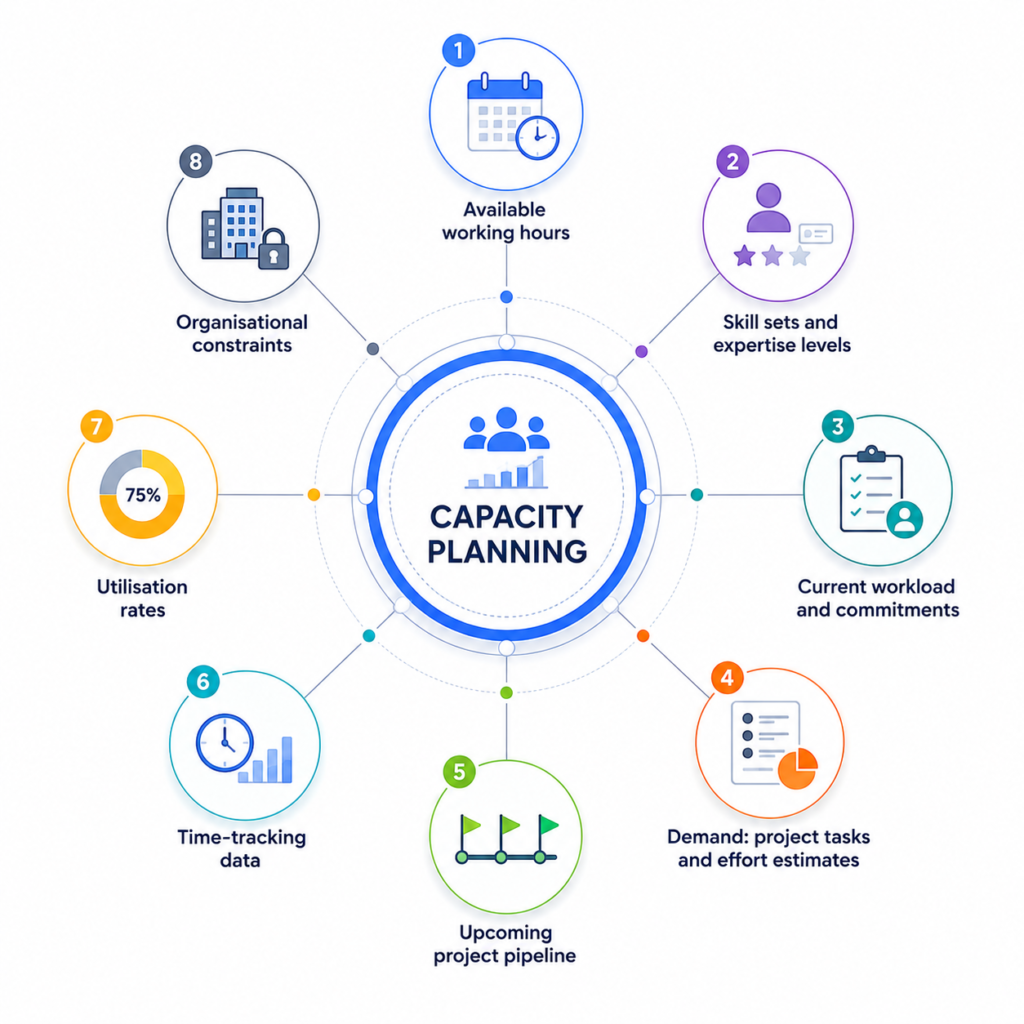
- The Key Components of Capacity Planning
- The 4 Capacity Planning Strategies
- Types of Capacity Planning
- Capacity Planning Process: Step by Step
- The Capacity Utilisation Formula (and How to Use It)
- Capacity Planning Template
- Common Capacity Planning Challenges (and How to Fix Them)
- Capacity Planning Best Practices
- Capacity Planning Tools: What to Look For
- Capacity Planning in Different Industries
- Frequently Asked Questions
What Is Capacity Planning in Project Management?
Capacity planning in project management is the process of comparing the work your team needs to do (demand) against the time, skills, and people available to do it (capacity), and making decisions accordingly.
It answers three questions:
- How much work can the team realistically take on?
- Do we have the right skills available at the right time?
- Where are the gaps, and what do we do about them?
Think of it as the bridge between your project schedule and your team’s reality. Without it, you’re making commitments based on assumptions. With it, you’re making commitments based on data.
Capacity Planning vs. Resource Planning: What’s the Difference?
These two terms get used all the time interchangeably, but they refer to different things.
| Capacity Planning | Resource Planning | |
|---|---|---|
| Question it answers | Can we do this work? | Who does this work? |
| Focus | Availability, hours, skill coverage | Task assignment, scheduling |
| Scope | Team-wide and future-looking | Project-specific |
| Output | Go/no-go decisions, hiring flags | Resource assignments |
Resource planning tells you who does what. Capacity planning tells you whether it’s possible at all. You need both, but capacity planning comes first.
Why Capacity Planning Matters: The Numbers
The value of capacity planning is not hard to see, but the data makes the case even clearer.
- 58% of organizations say aligning capacity with demand is their top resource management priority for 2026, tied with improving operational efficiency. It also found that the average utilization rate across organizations is 72%, which falls below the 80% to 85% range many professional services firms aim for. That difference represents time and resources that are not being used effectively.
- Visibility is another major issue. 47% of resource management teams say their biggest challenge is a lack of visibility into capacity and demand. The problem is often not hiring or tools. It is not having a clear picture of who is available and what work is coming.
- The impact also shows up at the team level. Employees are 70% more likely to experience burnout when working under unreasonable time constraints, which often happens when teams are overloaded without realizing it early enough.
- The gap becomes even clearer when looking ahead. 90% of leaders believe their organizations need to improve capacity building, but only 5% believe they are already in a good position.
The gap between recognizing the importance of capacity planning and implementing it effectively is where many organizations struggle. Strong processes, accurate data, and visibility are what close that gap.
The Key Components of Capacity Planning
Before you can plan capacity, you need to understand what goes into it. These are the inputs your plan needs to be accurate.
1. Available working hours
Total hours per team member after accounting for leave, public holidays, part-time schedules, and any non-project time (admin, training, meetings). This is your baseline capacity.
2. Skill sets and expertise levels
Two people with the same job title aren’t interchangeable. A senior developer and a junior developer don’t have the same capacity for a complex architecture task. Your plan needs to reflect actual skills, not just headcount.
3. Current workload and commitments
What is each team member already working on? Any existing commitments reduce available capacity for new work, and they need to be accounted for before you add anything new.
4. Demand: project tasks and effort estimates
What work needs to be done, and how long will it realistically take? This is the demand side of the equation. The more accurate your estimates, the more accurate your plan.
5. Upcoming project pipeline
Future projects create future demand. Good capacity planning looks ahead, not just at what’s active today but at what’s coming in the next quarter.
6. Time-tracking data
Historical time data is what turns estimates from guesses into evidence. When you know how long similar tasks have taken in the past, your forecasts improve significantly.
7. Utilisation rates
Utilisation tells you how much of a team member’s available capacity is actually being used. Too high signals overload and burnout risk. Too low suggests underuse, which carries its own costs.
8. Organisational constraints
Budget limits, hiring freezes, contractor availability, software licences: any factor that affects how much work the team can realistically deliver.
The 4 Capacity Planning Strategies
Different organisations approach capacity planning differently based on their risk tolerance, budget constraints, and the nature of their work. Here are the four main strategies:
1. Lead Strategy
Add capacity before demand increases. You anticipate growth and hire or onboard resources proactively.
Best for: Teams with predictable seasonal surges, or organisations preparing for large known projects.
Watch out for: Higher upfront cost; risk of unused capacity if demand doesn’t materialise.
2. Lag Strategy
Add capacity after demand has already risen. You wait for confirmed need before committing resources.
Best for: Conservative organisations that prioritise cost control.
Watch out for: Risk of being understaffed during spikes, leading to overload and potential delivery delays.
3. Match Strategy
Incrementally adjust capacity as demand shifts, in small steps rather than large jumps.
Best for: Teams in dynamic environments where project mix changes frequently.
Watch out for: Requires strong visibility and frequent plan updates to work well.
4. Skill-Based Capacity Planning
Plan based on specific capabilities, not just headcount. Instead of asking “do we have enough people?”, you ask “do we have enough people with the right skills?”
Best for: Knowledge-work teams, professional services, software development.
Watch out for: Requires a maintained skills inventory, which many teams don’t have.
Most organizations use a combination of lead and match strategies.
Types of Capacity Planning
Capacity planning can also be categorised by what’s being measured:
- Workforce capacity planning focuses on your team’s availability, skill coverage, and bandwidth. This is the most common type in project management.
- Tool and technology capacity planning checks whether your team has the software licences, hardware, and infrastructure they need.
- Financial capacity planning assesses whether budget is available to support the work.
For most project managers, workforce capacity is the primary concern, and that’s where this guide is focused.
Capacity Planning Process: Step by Step
Step 1: Define the Demand
Start by getting clear on what needs to be done. List all tasks, milestones, and deliverables for current and upcoming projects. Break them down into effort estimates (hours of work, not calendar time). If you don’t have estimates, use historical data from similar tasks as a starting point.
Key question: How many hours of work does this project require, and when do those hours need to happen?
Step 2: Calculate Your Team’s Available Capacity
For each team member, calculate their actual available hours during the planning period.
The formula:
Available Capacity = (Working days × Daily work hours) − Leave − Meetings & admin − Non-project commitmentsFor example: A team member working a 5-day week with 8-hour days has 40 hours/week in theory. After accounting for roughly 30% on non-project work (meetings, admin, emails), their realistic available capacity is closer to 28 hours/week.
Most teams plan for 70-80% utilisation on project work, keeping 20-30% as a buffer for unplanned work, changes in scope, and the inevitable admin overhead. A commonly referenced benchmark is 80% target utilisation on planned work.
Step 3: Map Skills to Tasks
Match the work to the people who can actually do it. Create a simple skills matrix if you don’t have one: a grid of team members vs. required competencies, rated by proficiency.
This step prevents a common failure mode where you assign someone to a task that looks like a match on paper but isn’t in practice.
Step 4: Compare Demand vs. Available Capacity
Now you run the numbers.
Capacity Gap Formula:
Capacity Gap = Available Capacity − Project DemandIf the result is positive, you have room for more work. If the result is negative, you have a gap to address.
Example:
- Team available hours this sprint: 290 hours
- Project demand this sprint: 320 hours
- Capacity Gap: −30 hours
That’s a 30-hour shortfall, roughly one full-time person’s available capacity for the period. Without this calculation, your team would be absorbing overload silently.
Step 5: Identify and Address the Gaps
Now that you can see the gap, you have several options:
- Reprioritise: Which projects are most important? Can lower-priority work be pushed?
- Extend the timeline: Can delivery dates shift to match available capacity?
- Redistribute work: Are tasks assigned to overburdened team members that could move to someone with more capacity?
- Bring in additional resources: Contractors, freelancers, or new hires
- Reduce scope: Is there a minimum viable version of the project that meets the core objective with less resource demand?
The right option depends on your constraints. The point is that you’re making this decision deliberately, not discovering the problem after it’s already caused damage.
Step 6: Allocate Resources
With gaps addressed, assign team members to tasks based on availability, skill match, and project priority. Build your resource allocation plan.
Step 7: Track Time and Update the Plan
A capacity plan that doesn’t get updated quickly becomes useless. As work progresses:
- Track actual hours spent vs. estimates
- Update availability when team members take unexpected leave or take on ad hoc work
- Re-run the demand vs. capacity comparison when new projects arrive or existing ones change
Step 8: Review and Refine Regularly
Review frequency varies by organisation type: manufacturing companies may review once per quarter, service-based organisations may do it monthly, and fast-moving project environments may need weekly check-ins. Match the cadence to the pace at which your project mix changes.
The Capacity Utilisation Formula (and How to Use It)
Utilisation rate is the single most important metric in capacity planning.
Individual Utilisation Rate
Utilisation (%) = (Hours Worked on Projects / Total Available Hours) × 100Example: A team member works 32 hours on project tasks in a 40-hour week.
(32 / 40) × 100 = 80% utilisation
Team Utilisation Rate
Team Utilisation (%) = Sum of individual utilisation rates / Number of team membersWhat’s a Good Utilisation Rate?
| Utilisation Rate | What It Signals |
|---|---|
| Below 70% | Underutilisation — capacity being left idle; cost inefficiency |
| 70-80% | Healthy zone — good delivery rhythm with buffer for unexpected work |
| 80-85% | High performance zone — achievable sustainably for most roles |
| Above 90% | Warning zone — burnout risk, no buffer for urgent requests or rework |
| 100% | Unsustainable — any unplanned work causes delays or quality drops |
Most project teams plan for 70-80% target utilisation, keeping 20-30% as a buffer for unplanned tasks, scope changes, and delays. Rates above 80% may be difficult to sustain long-term due to burnout risk.
Capacity Planning Template
Use this template as a starting point. It works in any spreadsheet tool (Excel, Google Sheets), or you can adapt it to your project management software.
Team Capacity Planning Sheet
Copy this template into Excel, Google Sheets, or your project management tool.
Last Updated: [Date]
Updated By: [Name]
Section 1: Team Availability
| Team Member | Role | Weekly Hours | Leave (hrs) | Meetings & Admin (hrs) | Available for Project Work (hrs/week) |
|---|---|---|---|---|---|
| [Name] | [Role] | 40 | 0 | 8 | 32 |
| [Name] | [Role] | 40 | 8 | 8 | 24 |
| [Name] | [Role] | 32 (part-time) | 0 | 6 | 26 |
| Team Total | 82 | ||||
Tip: Include all recurring non-project time: stand-ups, 1:1s, admin. Most teams underestimate this at 20%; the actual figure is often 30%+.
Section 2: Project Demand
| Project | Task / Phase | Assigned To | Required Skills | Estimated Hours | Due Date | Priority |
|---|---|---|---|---|---|---|
| [Project A] | [Phase 1 – Research] | [Name] | [Research, UX] | 16 | [Date] | High |
| [Project A] | [Phase 2 – Build] | [Name] | [Dev – React] | 40 | [Date] | High |
| [Project B] | [Discovery] | [Name] | [Analysis] | 12 | [Date] | Medium |
| Total Demand | 68 hrs | |||||
Section 3: Capacity vs. Demand Summary
| Total Team Available Capacity | 82 hrs |
| Total Project Demand | 68 hrs |
| Capacity Gap (Available − Demand) | +14 hrs |
| Team Utilisation Rate | 83% |
Status: ✅ Capacity available. Monitor utilisation, currently in the high-performance zone.
Section 4: Skills Matrix
| Team Member | [Skill A] | [Skill B] | [Skill C] | [Skill D] |
|---|---|---|---|---|
| [Name] | ✅ Expert | ✅ Proficient | ❌ None | ⚠️ Learning |
| [Name] | ⚠️ Learning | ✅ Expert | ✅ Proficient | ❌ None |
Key: ✅ Proficient/Expert | ⚠️ Learning | ❌ None
Section 5: Capacity Flags and Actions
| Flag | Team Member | Issue | Recommended Action |
|---|---|---|---|
| ⚠️ Overloaded | [Name] | Assigned 48 hrs vs. 32 available | Redistribute 16 hrs to [Name] or push [Task] to next sprint |
| ⚠️ Skill gap | [Task] | Requires [Skill X] – no one proficient | Consider contractor or upskilling plan |
| ✅ Clear | [Name] | 20 hrs available vs. 12 hrs demand | Available for additional scoped work |
Need help planning team capacity?
Need the template and a free capacity planning audit? Talk to our team and get personalized recommendations.
Common Capacity Planning Challenges (and How to Fix Them)
Even teams that take capacity planning seriously run into these problems regularly.
Challenge 1: No visibility into real availability
The problem: Managers rely on what people say they’re available for, not what the data shows.
The fix: Centralise availability data (leave calendars, ongoing commitments, part-time schedules) into one place. Real-time visibility beats weekly check-ins.
Challenge 2: Estimates that are always wrong
The problem: Tasks take longer than planned, because estimates are based on optimism rather than history.
The fix: Track actual time spent. After enough data, your estimates become calibrated. Most capacity planning tools let you compare planned vs. actual hours automatically.
Challenge 3: Planning for headcount, not skills
The problem: A team member is “available,” but not for this type of work.
The fix: Build and maintain a skills matrix. When planning capacity, match tasks to skills, not just availability.
Challenge 4: Plans that go stale immediately
The problem: You update the capacity plan on Monday. By Wednesday, two things have changed and no one has updated the plan.
The fix: Shorter review cycles. Treat the capacity plan as a living document, not a one-time exercise. Many teams do a quick 15-minute capacity check at the start of every week.
Challenge 5: Only planning for current projects
The problem: You’re fully allocated, and then a new project arrives that everyone knew was coming, except the capacity plan.
The fix: Include your project pipeline in your planning. Tentative and forecast projects should appear in the demand column, even if not yet confirmed.
Challenge 6: Ignoring non-project time
The problem: People are scheduled at 100%, but 25-30% of their time goes to meetings, admin, and email.
The fix: Build this overhead into your available capacity calculation from the start.
Capacity Planning Best Practices
These are the habits that separate teams who do capacity planning well from teams that just go through the motions.
Plan for 70-80%, not 100%. A team running at full theoretical capacity has no buffer for urgent requests, rework, or the unexpected. Build the buffer in deliberately.
Review plans at least bi-weekly. Workloads and project scopes change constantly. A capacity plan that’s two weeks out of date is making decisions on stale data.
Use time-tracking as your feedback loop. Planned hours vs. actual hours is the most reliable signal you have. Without it, every estimate is just an educated guess.
Start with one team before scaling. If you’re implementing capacity planning for the first time, pilot it with one team, get the process right, and then expand. Trying to roll it out everywhere at once rarely works.
Make capacity visible to the whole team. When team members can see overall capacity and demand, they self-regulate better, flag problems earlier, and make better decisions about taking on ad hoc work.
Re-evaluate capacity before every new project intake. Don’t just check in when something goes wrong. Every new project should start with a fresh capacity check.
Treat the plan as a conversation starter, not a contract. Capacity planning is about making better decisions, not predicting the future perfectly. The value is in the visibility and the conversations it triggers.
Capacity Planning Tools: What to Look For
There’s no shortage of tools that can support capacity planning. The right choice depends on your team size, project complexity, and how much of your process is centralised.
Project Management Software
Tools like Juntrax give you visibility into what work needs to be done, which is the demand side of the equation. Gantt charts, task lists, and project timelines help you understand total workload at a glance.
Resource Management Software
Dedicated resource management tools focus on availability: who’s free, when, and with what skills. These sit on the capacity side of the equation.
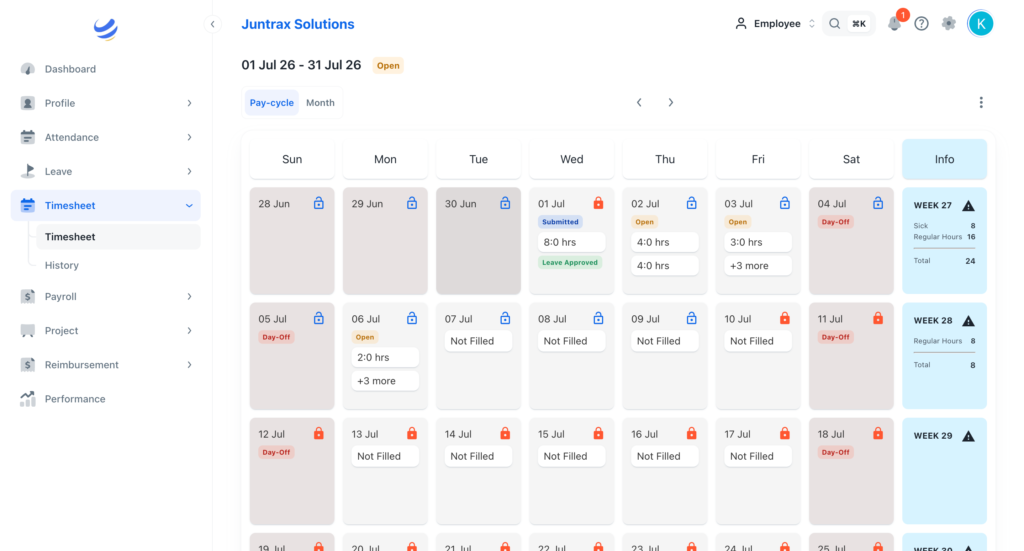
Time-Tracking Tools
Time tracking is what makes your capacity plan accurate over time. Tools like Juntrax or built-in timesheets give you the actual data to compare against estimates.
Integrated Platforms
The cleanest setup for capacity planning is a platform that integrates project schedules, resource availability, time tracking, and skills data into a single place. This eliminates the gaps that appear when you’re switching between systems, and gaps in data lead to gaps in planning.
Juntrax is built exactly for this: an integrated business management platform that brings together HR, project management, and financial workflows. For professional services teams managing multiple concurrent projects, having resource availability, skill data, time tracking, and project timelines in one system means you always have the complete picture when you’re making capacity decisions.
Manage capacity with complete visibility
Keep resource availability, project timelines, skills data, and workload planning connected in one place.
Capacity Planning in Different Industries
Capacity planning looks different depending on what your team does.
Professional Services
Billable utilisation is everything. Capacity planning directly determines revenue. A well-run professional services firm uses capacity planning to decide whether to take on a new client engagement, when to hire, and how to balance delivery across projects without burning out senior staff. The average architecture and engineering firm operates at 81% utilisation, while top performers reach 94%, a gap that translates directly into profitability.
Software Development (Agile)
Sprint planning is capacity planning. Agile teams calculate capacity at the start of each sprint, accounting for ceremonies, code reviews, and overhead, and only commit to work that fits within that capacity. This is where the concept of velocity (how much work a team can reliably complete per sprint) becomes a direct measure of team capacity.
Construction and Engineering
Multiple parallel projects with hard deadlines make capacity planning critical and complex. Equipment, labour, and materials all have capacity constraints. The lead strategy is common here because firms often bring on resources before demand peaks, since hiring and mobilising construction teams takes time.
Marketing and Creative Agencies
Capacity planning protects creative teams from the classic “feast or famine” workload cycle. When teams track time against projects and maintain visibility into upcoming campaign timelines, they can pace work more evenly and avoid the crunch cycles that lead to quality drops and turnover.
Conclusion
Capacity planning in project management isn’t a complex discipline, but it does require consistency.
The teams that do it well aren’t using more sophisticated tools or spending more time planning. They’re doing a few things consistently: keeping their availability data accurate, comparing demand against real capacity before committing, tracking actual time against estimates, and reviewing regularly enough that the plan stays current.
That consistency is what turns capacity planning from a theory into a competitive advantage: better project timelines, less team burnout, more reliable delivery, and the ability to say “yes” or “no” to new work with confidence rather than crossed fingers.
Use the template in this guide as your starting point. Update it regularly. And if you want a single platform that keeps all of this in one place (availability, skills, time tracking, and project data), Juntrax is built for exactly that.
Frequently Asked Questions
What is capacity planning in project management?
Capacity planning in project management is the process of evaluating whether your team has enough time, skills, and resources to meet the demands of current and upcoming projects. It compares your team’s available capacity (hours, skills, and bandwidth) against project demand (required effort, tasks, and timelines) to identify gaps and make informed decisions about workload, hiring, and scheduling.
What is the difference between capacity planning and resource planning?
Capacity planning determines whether the team can handle the work, answering the question of feasibility. Resource planning determines who does specific tasks. Capacity planning comes first; resource planning follows once capacity has been confirmed.
How do you calculate capacity in project management?
Available capacity is calculated as: (Working days × Daily work hours) − Leave − Non-project time. For example, a full-time team member working 40 hours per week with 8 hours of meetings and admin has approximately 32 hours of available project capacity. Multiply across the team to get total available capacity, then compare to project demand.
What is a good utilisation rate for a project team?
Most organisations target 70-80% utilisation on planned project work, keeping 20-30% as a buffer. High-performing teams in professional services often run 80-85%. Rates consistently above 90% signal burnout risk and leave no room for unplanned work or scope changes.
How often should you update your capacity plan?
At minimum, review your capacity plan bi-weekly. Fast-moving teams often do a quick check at the start of each week. Any time a project scope changes, a new project is added, or team availability shifts significantly, the plan should be updated.
What are the three main capacity planning strategies?
The three core strategies are: lead (add capacity before demand peaks), lag (add capacity after demand has risen), and match (adjust capacity incrementally as demand shifts). Most organisations use a hybrid approach in practice.
Can you do capacity planning in a spreadsheet?
Yes. A well-maintained spreadsheet with availability, demand, and skills data works for smaller teams (typically up to 15-20 people). Beyond that, the manual update burden outpaces the value, and purpose-built tools become necessary to maintain accuracy.