

Enterprise resource planning (ERP) software has become foundational infrastructure for businesses of every size. With the global ERP market valued at over $73 billion in 2025 and cloud deployments now representing 70% of all implementations, the shift toward integrated business management platforms is accelerating across industries.
Yet despite this momentum, more than 70% of recently implemented ERP initiatives will fail to fully meet their original business goals by 2027. That gap between promise and outcome makes understanding ERP systems thoroughly, before you buy, more important than ever.
This guide covers what ERP solutions are, how their core modules work, what deployment models are available, how to evaluate vendors, and how to avoid the implementation pitfalls that derail most projects. Whether you’re a 20-person professional services firm or a mid-market manufacturer with 500 employees, this resource is designed to help you make an informed decision.
What Is an ERP Solution?
An ERP (Enterprise Resource Planning) solution is a type of software that integrates a company’s core business functions into a single, unified platform. Rather than running separate tools for accounting, payroll, inventory, project management, and customer data, an ERP system consolidates these processes into one shared database.
This integration gives every department access to the same real-time information, eliminating data silos and reducing the manual handoffs that slow operations down. When a sales order is entered in one module, the inventory module adjusts stock levels, the finance module records the revenue, and the production module schedules the work, all automatically.
The term “enterprise resource planning” was coined by Gartner Group in the 1990s, but the concept traces back to material requirements planning (MRP) systems used in manufacturing as early as the 1960s. Modern ERP platforms have expanded far beyond manufacturing, serving professional services firms, retailers, healthcare organizations, and government agencies.
ERP vs. CRM: Understanding the Difference
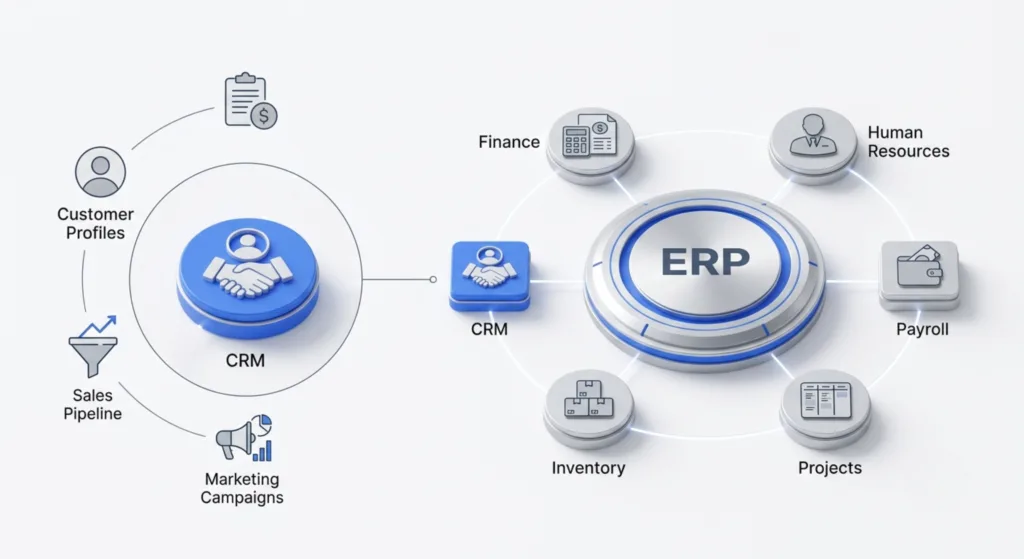
A common source of confusion is the relationship between ERP and CRM (Customer Relationship Management). A CRM focuses specifically on managing customer interactions, sales pipelines, and marketing campaigns. An ERP system is broader, covering finance, supply chain, human resources, and operations across the entire organization. Many modern ERP platforms include a CRM module, so businesses can manage customer relationships within the same system that handles their financials and operations. If your primary need is tracking leads and sales activity, a standalone CRM may suffice. If you need to connect that sales data to inventory, invoicing, payroll, and project delivery, you need an ERP.
Core ERP Modules and What They Do
ERP systems are modular by design. Organizations typically start with the modules that address their most pressing needs and expand over time. Below are the most common modules and the business functions they support.
Financial Management
The financial module is the backbone of any ERP system. It centralizes all financial transactions and provides the system of record for the organization. Key capabilities include general ledger management, accounts payable and receivable, budgeting and forecasting, expense tracking, and automated financial reporting. A strong financial module ensures compliance with reporting standards (GAAP, IFRS) and gives leadership real-time visibility into cash flow, profitability, and financial health.
For growing businesses, the financial module often delivers the fastest ROI because it replaces error-prone spreadsheets and disconnected accounting tools with a single source of truth.
Related: Explore Juntrax’s financial management module →
Human Resources (HRMS)
The HR module automates workforce management tasks that consume disproportionate time in growing companies. This includes payroll processing, employee onboarding, attendance and leave tracking, performance management, benefits administration, and compliance reporting.
An integrated HRMS module connects employee data to project management and financial systems, making it possible to calculate true labor costs per project, track billable utilization, and generate accurate workforce analytics.
Related: See how Juntrax HRMS simplifies workforce management →
Supply Chain Management (SCM)
For product-based businesses, the supply chain module manages the flow of goods from procurement through delivery. Core functions include inventory management, vendor and supplier management, purchase order automation, logistics and distribution coordination, and demand forecasting.
Effective SCM modules provide real-time visibility into stock levels and automatically trigger purchase orders when inventory drops below defined thresholds. This prevents both stockouts and overstock situations that tie up working capital.
Project Management and Professional Services Automation (PSA)
Service-based businesses, including consulting firms, IT services companies, and agencies, rely on project management and PSA modules to plan, execute, and monitor engagements. These modules handle task scheduling and milestone tracking, resource allocation across projects, time and expense tracking, budget management, and real-time project profitability analysis.
PSA functionality is particularly valuable for professional services firms where billable utilization is the primary revenue driver. Connecting project data to financials and HR in a single ERP system eliminates the reconciliation overhead that plagues firms using disconnected tools.
Related: Learn about Juntrax PSA for professional services →
Customer Relationship Management (CRM)
When CRM is embedded within an ERP system, customer data connects directly to order management, invoicing, and support workflows. Typical CRM module capabilities include contact and account management, sales pipeline tracking, marketing campaign management, customer support ticketing, and customer analytics and segmentation.
The advantage of ERP-integrated CRM over a standalone tool is that sales teams can see inventory availability, delivery timelines, and account payment history without switching systems.
Manufacturing and Production
Manufacturing modules support the operational needs of companies that build physical products. They include production scheduling, bill of materials (BOM) management, quality control and inspection, work order management, and materials requirement planning (MRP).
Manufacturing ERP requirements tend to be more specialized than those of service businesses, and industry-specific solutions (from vendors like Epicor, Infor, and SAP) often include pre-built configurations for discrete, process, and mixed-mode manufacturing environments.
Business Intelligence and Analytics
Most modern ERP platforms include reporting and analytics capabilities that turn operational data into strategic insight. These tools provide dashboards and KPI tracking, data visualization, trend analysis and forecasting, and ad-hoc reporting across all modules.
Because an ERP system centralizes data from every business function, the analytics module can surface correlations and patterns that fragmented systems would never reveal, such as the relationship between project staffing decisions and client retention rates, or the impact of supplier lead times on production costs.
ERP Deployment Models: Cloud, On-Premise, and Hybrid
One of the most consequential decisions in an ERP project is the deployment model. Each approach has distinct implications for cost, control, scalability, and ongoing maintenance.
Cloud-Based ERP
Cloud ERP solutions are hosted by the vendor and accessed via the internet on a subscription basis. The cloud segment held 54.4% of market revenue in 2025, and that share continues to grow as organizations prioritize flexibility over infrastructure control.
Advantages of cloud ERP include lower upfront investment (operating expense vs. capital expense), faster deployment timelines (typically weeks to months rather than a year or more), automatic updates and patches managed by the vendor, access from any location with internet connectivity, and elastic scalability as the business grows.
Cloud ERP is particularly well-suited for small and mid-sized businesses that lack dedicated IT infrastructure teams. It removes the burden of server management, security patching, and disaster recovery planning from the customer’s plate.
On-Premise ERP
On-premise ERP systems are installed on the organization’s own servers and managed by in-house IT staff. This model offers maximum control over data, customization, and system architecture. It remains common among large enterprises with strict regulatory requirements, extensive legacy integrations, and the IT resources to manage complex infrastructure.
The tradeoffs are significant: higher upfront licensing costs, longer implementation timelines, ongoing maintenance and upgrade responsibilities, and limited remote access unless additional infrastructure is deployed.
Hybrid and Two-Tier ERP
Some organizations adopt a hybrid approach, running core financials on-premise while deploying cloud-based modules for functions like HR, CRM, or regional operations. This “two-tier” strategy, described by Gartner as “postmodern ERP,” lets companies modernize incrementally without replacing their entire system at once.
Hybrid models are especially common in organizations with global operations, where a central ERP handles consolidated reporting while regional cloud instances accommodate local currencies, tax codes, and compliance requirements.
Cloud vs. On-Premise: A Quick Comparison
| Factor | Cloud ERP | On-Premise ERP |
| Upfront Cost | Low (subscription-based) | High (license + infrastructure) |
| Deployment Speed | Weeks to months | 6–18+ months |
| Maintenance | Vendor-managed | In-house IT required |
| Scalability | Elastic, on-demand | Limited by physical infrastructure |
| Customization | Moderate (configuration-focused) | Extensive (code-level access) |
| Data Control | Vendor-hosted (with SLAs) | Full on-site control |
| Remote Access | Built-in | Requires additional setup |
| Best For | SMBs, growing companies, distributed teams | Large enterprises with complex regulatory needs |
How Much Does ERP Actually Cost? Understanding Total Cost of Ownership
ERP pricing is notoriously opaque, and the sticker price rarely reflects the full investment. Understanding total cost of ownership (TCO) before you commit prevents the budget surprises that derail many projects.
Subscription or License Fees
Cloud ERP vendors typically charge per user per month, with prices ranging from $50/user/month for basic platforms to $300+/user/month for enterprise-grade solutions. On-premise licenses involve a one-time fee (often $3,000–$10,000+ per user) plus annual maintenance fees of 15–22% of the license cost.
Implementation Costs
Implementation is where costs most often exceed expectations. Panorama Consulting reports that 23% of ERP projects exceed budgets, with half needing additional technology that was not planned for, and 40% underestimating staffing requirements. Implementation costs typically include data migration and cleansing, system configuration and customization, integration with existing tools, user training, and consulting and project management fees.
For a mid-sized business (50–200 employees), total first-year implementation costs for a cloud ERP typically range from $75,000 to $500,000 depending on complexity, number of modules, and degree of customization.
Ongoing Costs
After go-live, recurring costs include subscription renewals or maintenance fees, additional user licenses as the company grows, ongoing training for new employees, system administration, and periodic customization as business processes evolve.
A realistic TCO projection should cover at least five years, factoring in growth, module expansion, and the cost of the staff time dedicated to managing the system.
How to Choose the Right ERP Solution
Selecting an ERP platform is one of the more consequential technology decisions a growing business will make. A structured evaluation process reduces the risk of choosing a system that doesn’t fit.
Start with Your Business Processes, Not Feature Lists
The most common vendor selection mistake is comparing feature lists instead of evaluating how well a system supports your actual workflows. Before you look at any vendor, document your current processes across every function the ERP will touch, identify the bottlenecks, manual handoffs, and data gaps causing the most pain, and define what “success” looks like in measurable terms (e.g., invoice processing time reduced by 40%, monthly close completed in 3 days instead of 10).
This process map becomes your evaluation scorecard. Instead of asking “does the system do X?” you ask “does the system support the way we need to do X?”
Evaluate Against These Criteria
Scalability: Can the system accommodate your projected growth over 3–5 years without a major overhaul? Look for platforms that allow you to add users and modules incrementally.
Industry fit: Does the vendor serve businesses in your sector? Vertical-specific ERP solutions include pre-built workflows, compliance tools, and reporting templates tailored to your industry, which means less customization and faster time to value.
Integration capabilities: Will the ERP connect cleanly with your existing tools (CRM, email, banking, e-commerce)? Open APIs and pre-built integrations matter more than raw feature count.
Vendor stability and support: Research the vendor’s track record. How long have they been in business? What does their customer support model look like? Do they offer ongoing training and documentation?
User experience: A system nobody uses is worse than no system at all. Prioritize platforms with clean interfaces, mobile accessibility, and intuitive navigation. Request trial access and have actual end users (not just IT) evaluate the experience.
The ERP Readiness Checklist
Before committing to an ERP project, evaluate your organization against these readiness indicators:
- You have documented your current workflows across finance, HR, and operations
- You can articulate specific, measurable goals for the ERP investment
- You have identified an executive sponsor who will champion the project
- You have allocated budget for implementation, training, and change management (not just software)
- Your data is in a state where it can be migrated (or you have a plan to clean it)
- You have a cross-functional team available to commit significant time during implementation
- Your leadership team understands that ERP is a business transformation project, not just a software purchase
If three or more of these items are unresolved, invest time in addressing them before engaging vendors. Projects that skip this readiness phase account for a disproportionate share of the 55–75% of ERP implementations that fail to meet objectives.
ERP Implementation: What Actually Makes Projects Succeed or Fail
Understanding why ERP projects fail is as important as understanding what the software does. The patterns are well-documented, and the majority of failures are preventable.
Why Most ERP Projects Underperform
Gartner’s research consistently shows that more than 70% of ERP implementations fail to fully meet their original business goals. Prosci’s 2025 research adds nuance, finding that human factors matter 6 times more than technical factors in determining ERP outcomes. The most common failure causes are inadequate change management (employees resist new processes because no one explained why they need to change), poor requirements gathering in the early phases (the system gets built to a spec that doesn’t match actual business needs), unrealistic timelines and budgets that force teams to cut corners on testing and training, excessive customization that makes the system fragile and expensive to maintain, and data migration issues where legacy data is corrupted, inconsistent, or incomplete.
Lessons from High-Profile Failures
The scale of ERP failure can be staggering. Birmingham City Council in the UK began an Oracle Fusion implementation with a £19 million budget. By 2024, costs had reached approximately £90 million, with total projected costs through 2026 approaching £216 million. The project’s challenges were cited as a contributing factor in the council’s 2023 bankruptcy declaration.
Quebec’s SAAQ digital transformation project, which included SAP technology, was originally budgeted at approximately $600 million Canadian but ballooned to an estimated $1.1 billion.
These are extreme cases, but the underlying patterns (insufficient planning, scope expansion, inadequate change management) play out at smaller scales in mid-market and SMB implementations every day.
A Practical Implementation Framework
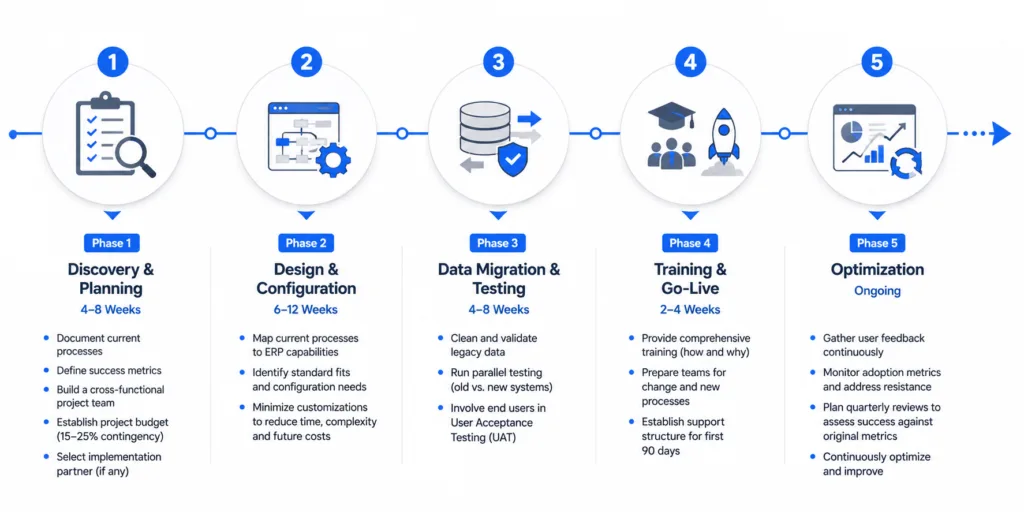
Successful implementations typically follow a phased approach:
Phase 1: Discovery and Planning (4–8 weeks)
Document current processes. Define success metrics. Build a cross-functional project team. Establish the project budget with contingency (15–25% buffer is standard practice). Select your implementation partner if using one.
Phase 2: Design and Configuration (6–12 weeks)
Map current processes to the ERP system’s capabilities. Identify where the system’s standard workflows meet your needs and where configuration is required. Resist the urge to customize extensively during this phase. Every customization increases implementation time, testing complexity, and future upgrade costs.
Phase 3: Data Migration and Testing (4–8 weeks)
Clean and validate legacy data before migrating. Run parallel testing where the old and new systems operate simultaneously. Involve actual end users in user acceptance testing (UAT), not just the project team.
Phase 4: Training and Go-Live (2–4 weeks)
Invest in comprehensive training that covers not just how to use the system, but why processes are changing. Establish a support structure for the first 90 days post-launch, when the majority of user frustration and workaround behaviors emerge.
Phase 5: Optimization (Ongoing)
Gather user feedback continuously. Monitor adoption metrics and address resistance early. Plan quarterly reviews to assess whether the system is delivering against original success metrics.
ERP Trends Shaping 2026 and Beyond
The ERP landscape continues to evolve rapidly. Several trends are reshaping how businesses select, deploy, and use these systems.
AI and Machine Learning Integration
AI-powered capabilities are moving from experimental features to core ERP functionality. Gartner expects that by 2028, around 80% of ERP systems will include generative AI and predictive analytics as standard. Practical applications already in production include automated invoice processing and matching, predictive demand forecasting that adjusts for seasonality and market signals, anomaly detection in financial transactions, intelligent recommendations for resource allocation, and natural language querying of business data (asking the system questions in plain English instead of building reports).
Composable ERP
The traditional model of a single, monolithic ERP system is giving way to composable architectures. In a composable ERP approach, businesses assemble their platform from interchangeable modules connected through APIs. This lets organizations swap out individual components (e.g., replacing a basic CRM module with a best-of-breed CRM tool) without rearchitecting the entire system. The composable model reduces vendor lock-in and allows faster adoption of new capabilities.
Industry-Specific (Vertical) Solutions
Generic, one-size-fits-all ERP platforms are losing ground to solutions built for specific industries. These vertical ERP systems include pre-configured workflows, regulatory compliance tools, and reporting templates tailored to sectors like manufacturing, healthcare, professional services, construction, and retail. For SMBs in particular, vertical solutions offer a faster path to value because they require less customization to match industry-standard processes.
Sustainability and ESG Tracking
Regulatory pressure around Environmental, Social, and Governance (ESG) reporting is driving demand for ERP features that track carbon footprints, energy consumption, waste metrics, and supply chain sustainability. Organizations subject to mandatory ESG disclosure requirements (which are expanding globally) increasingly treat this capability as a requirement, not a nice-to-have.
Mobile-First Access
Remote and hybrid work models have made mobile ERP access a baseline expectation. Modern platforms offer responsive web interfaces and native mobile apps that allow managers to approve purchase orders, review project status, access dashboards, and submit expenses from any device.
ERP for Small and Mid-Sized Businesses: When Is the Right Time?
A persistent misconception is that ERP systems are only for large enterprises. In reality, 92% of high-performing SMBs either use or plan to use ERP systems, and cloud-based solutions have made adoption accessible at price points that work for companies with as few as 10–20 employees.
Signs Your Business Has Outgrown Its Current Tools
Several operational symptoms indicate that a business is ready for ERP. If your team is spending significant time on manual data entry between disconnected systems, monthly financial close takes more than a week because data needs to be reconciled across multiple spreadsheets, you lack real-time visibility into cash flow, project profitability, or resource utilization, critical business data lives in individual employees’ spreadsheets rather than a shared system, or you’re adding headcount but operational overhead is growing faster than revenue, then a centralized ERP platform can address these pain points by eliminating redundant processes and giving leadership the visibility needed to make faster, better-informed decisions.
What SMBs Should Look For
Small and mid-sized businesses evaluating ERP platforms should prioritize solutions that offer subscription-based pricing with predictable monthly costs, rapid deployment (weeks, not months), pre-built modules for their core functions (typically finance, HR, and project management), intuitive interfaces that minimize training requirements, and a vendor with a strong track record serving businesses of similar size and industry.
The goal is to find a platform that addresses today’s pain points while providing room to grow. Over-investing in a complex enterprise system is as risky as under-investing in a tool you’ll outgrow within a year.
Making the Right ERP Decision
Choosing and implementing an ERP system is a significant undertaking. The organizations that succeed are those that treat ERP as a business transformation initiative rather than a software purchasing decision. They invest time in understanding their own processes before evaluating vendors. They budget realistically, including contingency for the unexpected. They prioritize change management and user adoption alongside technical configuration. And they choose systems that match their current scale while leaving room to grow.
The ERP market is expanding, cloud deployment is making adoption more accessible than ever, and AI-powered capabilities are raising the ceiling on what these platforms can deliver. For growing businesses, the question is less about whether to adopt ERP and more about when and how to do it well.
Ready to explore ERP for your business? Start a free trial with Juntrax →
Making the Right ERP Decision
Choosing and implementing an ERP system is a significant undertaking. The organizations that succeed are those that treat ERP as a business transformation initiative rather than a software purchasing decision. They invest time in understanding their own processes before evaluating vendors. They budget realistically, including contingency for the unexpected. They prioritize change management and user adoption alongside technical configuration. And they choose systems that match their current scale while leaving room to grow.
The ERP market is expanding, cloud deployment is making adoption more accessible than ever, and AI-powered capabilities are raising the ceiling on what these platforms can deliver. For growing businesses, the question is less about whether to adopt ERP and more about when and how to do it well.
Ready to explore ERP for your business?
See how Juntrax helps growing businesses manage HR, finance, projects, and operations in one platform.
Frequently Asked Questions About ERP Solutions
What does ERP stand for?
ERP stands for Enterprise Resource Planning. It refers to software that integrates core business processes (finance, HR, supply chain, operations) into a single platform with a shared database.
How is ERP different from accounting software?
Accounting software handles financial transactions. ERP goes beyond finance to integrate HR, supply chain, project management, CRM, and manufacturing into one system. An ERP’s financial module is typically more robust than standalone accounting software, and its value comes from connecting financial data to every other business function.
How long does an ERP implementation take?
Timelines vary significantly based on the size of the organization, number of modules, and degree of customization. Cloud ERP implementations for SMBs typically take 3–6 months. Mid-market implementations range from 6–12 months. Large enterprise deployments can take 12–24 months or longer.
How much does an ERP system cost?
Cloud ERP subscriptions typically range from $50 to $300+ per user per month. Total first-year costs (including implementation, data migration, training, and consulting) for a mid-sized business range from $75,000 to $500,000. On-premise solutions involve higher upfront costs but may have lower ongoing subscription fees.
Can a small business benefit from ERP?
Yes. Cloud-based ERP solutions are designed to scale, and many vendors offer packages specifically for businesses with 10–100 employees. The key is choosing a platform sized for your current needs that can grow with you, rather than over-investing in enterprise-grade features you won’t use.
What is the difference between cloud ERP and on-premise ERP?
Cloud ERP is hosted by the vendor and accessed via the internet on a subscription basis. On-premise ERP is installed on your own servers and managed by your IT team. Cloud ERP offers lower upfront costs, faster deployment, and automatic updates. On-premise ERP offers more customization control and may be required for certain regulatory environments.
Why do so many ERP implementations fail?
Research consistently shows that failure is driven primarily by organizational factors rather than technology: inadequate change management, poor requirements definition, unrealistic timelines, and insufficient training. Choosing the right implementation partner and investing in change management are the two highest-impact decisions you can make.